
Best Practices for Automating Offshore Team Monitoring
Best Practices for Automating Offshore Team Monitoring
Managing offshore teams can be tricky - different time zones, communication gaps, and keeping everyone on track without micromanaging. But automation tools can help cut through the chaos. They give you real-time updates on task progress, reduce admin work, and make workflows smoother. Here’s what you need to know:
- Why it matters: Automating monitoring can reduce project delays by up to 20% and speed up issue resolution by 32%. It’s all about results - tracking what gets done, not just hours worked.
- How it works: Tools like Hubstaff and Time Doctor track activity and generate automated timesheets. Pair them with project management platforms like Asana or Jira for a full view of progress.
- Challenges: Time zones and communication are still hurdles. A "follow-the-sun" approach, where tasks move across time zones, can help. Real-time dashboards also cut the need for endless meetings.
- Privacy balance: Automation shouldn’t feel like surveillance. Use tools that focus on deliverables, blur sensitive data, and let teams control what’s tracked.
- Getting started: Start small with a pilot project, integrate tools with your existing systems, and communicate clearly with your team to avoid trust issues.
The Secret To Managing an Offshore Software Team Like a PRO
sbb-itb-fe42743
How Automation Works in Offshore Team Monitoring
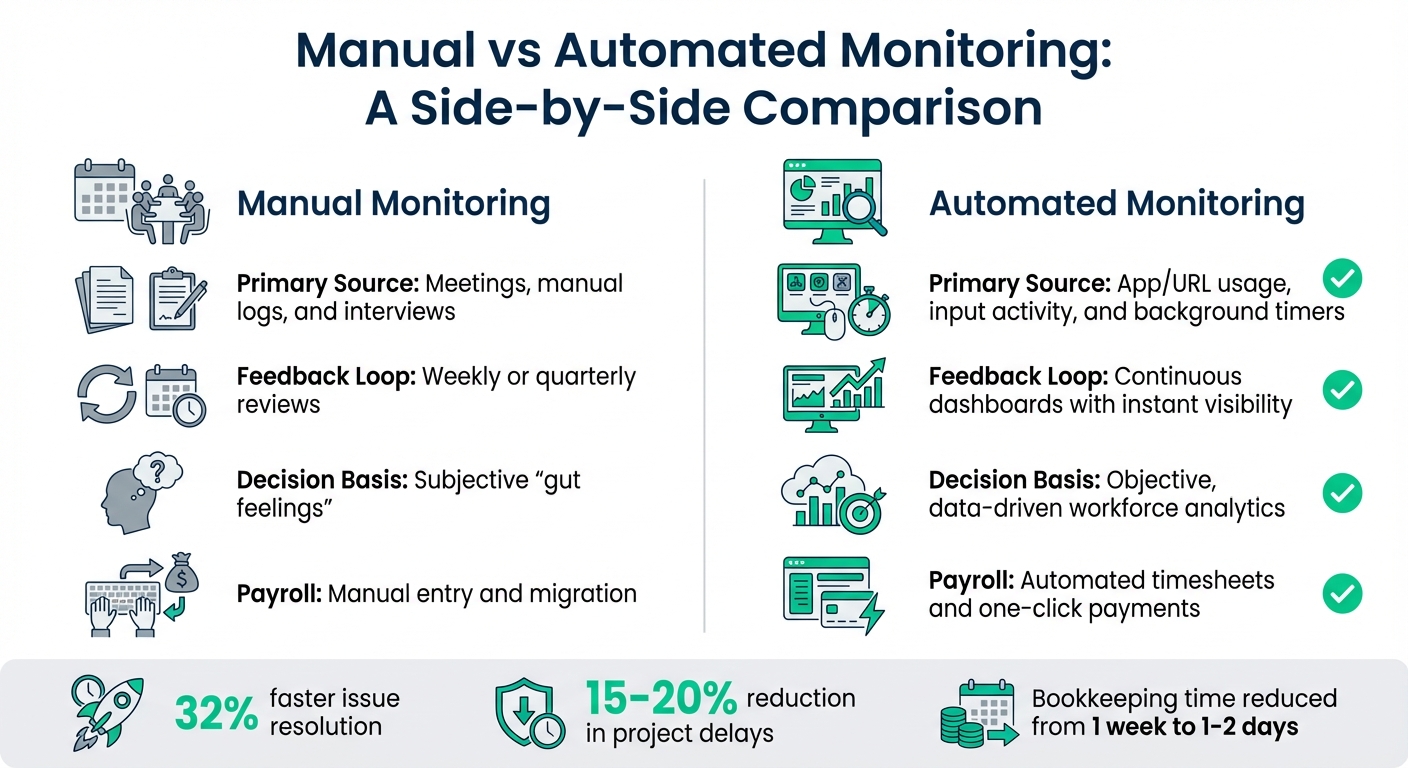
Manual vs Automated Offshore Team Monitoring: Key Differences
What Automated Monitoring Means
Automated monitoring works quietly in the background, gathering data as tasks progress without disrupting the developer's workflow. It keeps track of open applications, task durations, and milestone completions on an ongoing basis - not just during scheduled updates. This continuous data collection offers a sharp contrast to traditional methods.
Instead of relying on delayed reports or memory-dependent standups, automated systems provide real-time insights into sprint velocity and task progress. As Solomon Thimothy, President of OneIMS, explains:
"With tools like Hubstaff, you can tell [if a task should take 45 mins or 4 hours]. You then decide if a whole project should've taken 16 hours or if someone is just not the right fit" [2].
The data integrates directly into project management and payroll systems. Automated timesheets are generated from activity rates, streamlining the invoicing process and eliminating the need for manual input. This shift has helped teams cut bookkeeping time from a week to just 1-2 days [2]. Additionally, automated alerts keep managers informed, flagging approaching deadlines or missed check-ins so they can address issues promptly.
| Feature | Manual Monitoring | Automated Monitoring |
|---|---|---|
| Primary Source | Meetings, manual logs, and interviews [5] | App/URL usage, input activity, and background timers [6] |
| Feedback Loop | Weekly or quarterly reviews [3] | Continuous dashboards with instant visibility [3] |
| Decision Basis | Subjective "gut feelings" [6] | Objective, data-driven workforce analytics [2] |
| Payroll | Manual entry and migration [2] | Automated timesheets and one-click payments [2] |
While automation simplifies many processes, managing offshore teams still comes with its own set of hurdles, often requiring expert technical leadership to navigate.
Common Challenges When Managing Offshore Teams
Even with the efficiency of automated monitoring, managing offshore teams isn't without its complications. Time zones are often the biggest hurdle. For instance, when a London-based team logs off at 18:00, developers in Kyiv are finishing their day, and those in Manila are just beginning theirs. Coordinating manual check-ins across these time zones can be a logistical nightmare - expecting everyone to join a 09:00 GMT standup is simply unrealistic.
Communication adds another layer of complexity. Without in-person interactions, it’s harder to notice when someone is struggling or when priorities shift unexpectedly.
Automation helps turn these challenges into opportunities. Many teams adopt a "follow-the-sun" approach, where offshore developers pick up tasks as onshore teams finish for the day, effectively extending the development cycle. Real-time dashboards allow managers to monitor progress asynchronously, removing the need for live meetings. Automated tracking of sprint velocity - focusing on code commits and milestone completions rather than hours worked - has been shown to boost delivery speed by 19% [3]. Meanwhile, role-specific dashboards reduce confusion by 64%, ensuring everyone is clear about their responsibilities [3].
Balancing Automation with Privacy
While automation offers undeniable efficiencies, it’s essential to maintain a balance between oversight and privacy. Monitoring should never cross the line into surveillance. If it does, trust erodes, and productivity takes a hit.
Modern systems tackle this issue by prioritising deliverables over micromanagement. They include privacy-friendly features like blurring sensitive information in screenshots, avoiding keystroke logging altogether, and allowing team members to review or delete their own tracked data [2][6]. Data collection also stops the moment someone pauses their timer. As Hubstaff puts it:
"Monitoring shouldn't create suspicion or a sense that every move is being judged. Instead, it works best when positioned as a tool for process improvement and accountability" [6].
Types of Tools for Automating Offshore Team Monitoring
Choosing the right tools for monitoring offshore teams largely depends on what you aim to track. Some tools focus on how work is done - monitoring time and activity patterns - while others zero in on what is delivered, like tasks and milestones. Then there’s a third category designed to aggregate data into dashboards, helping you spot trends and potential risks before they become problems. Let’s break these categories down further.
Time Tracking and Activity Monitoring Tools
These tools quietly run in the background, recording work hours and tracking activity patterns. Popular options include Hubstaff (starting at £4.99 per user per month), Time Doctor (from £7.00 per user per month), ActivTrak (from £10.00 per user per month), and Insightful (starting at £6.40 per seat per month) [8].
Beyond just creating timesheets, these platforms can detect idle periods and flag unusual application use. Many even integrate directly with payroll systems, making admin tasks a breeze. However, it’s crucial to pick tools that respect employee privacy. Avoid intrusive features like keystroke logging, and look for platforms that offer transparency - such as allowing employees to view their own data and pause tracking when needed. This balance keeps monitoring effective without crossing ethical boundaries.
Project Management and Workflow Automation Tools
If time trackers tell you how long tasks take, project management tools show you what’s being accomplished. Platforms like Asana, ClickUp, monday.com, and Jira help organise tasks into Kanban boards, set deadlines, and track milestones in real time. When paired with time tracking tools, they can highlight discrepancies between estimated and actual task durations. This makes it easier to pinpoint inefficiencies and fine-tune workflows [10].
For offshore teams working across different time zones, these tools offer a major advantage: asynchronous visibility. Instead of constantly scheduling status meetings (which 71% of executives say are a waste of time [10]), team members can check progress updates on their own schedules. It’s a win-win for productivity and flexibility.
Analytics and Reporting Tools
Data is only useful if it leads to actionable insights. This is where analytics tools step in. Platforms like ActivTrak, Time Doctor, Teramind (from £5.00 per endpoint per month), and Intelogos transform raw tracking data into meaningful insights [8].
Using AI, these tools can flag patterns like burnout risks from excessive overtime, workflow bottlenecks caused by sluggish software, or even early signs of disengagement that could lead to turnover [9][12]. For example, Johan le Bail from Eufonie shared:
"Time Doctor led to a 30% increase in overall productivity" [9].
With these insights, leaders gain both a high-level overview of team performance and detailed task-specific data, often supported by fractional CTO expertise. It’s not just about monitoring; it’s about making smarter decisions to keep things running smoothly.
How to Implement Automated Monitoring
Rolling out automated monitoring isn't something you can rush. It takes careful planning and a step-by-step approach. A well-thought-out rollout helps teams stay aligned and resolve issues faster. On the flip side, rushing into it can lead to confusion and even erode trust within your team.
Start with a Phased Rollout
Jumping straight into a full-scale rollout is a recipe for chaos. Instead, start small - try a pilot project with one team to iron out any kinks and test workflows before scaling up [14]. This way, you can figure out which metrics actually matter in your specific context and establish some performance benchmarks.
A good rollout plan often follows three key steps. First, set up role-specific KPIs to create clear performance baselines. Then, integrate your monitoring tools with platforms like Jira or Asana and make reviewing metrics a regular habit. Organisations that take this structured approach have reported resolving issues 32% faster once they start using real-time dashboards [3].
If your team spans multiple time zones, focus on asynchronous workflows. For example, use 48-hour delivery cycles instead of expecting everyone to be online at the same time. Tools that account for time zone differences have been shown to cut project delays by 15-20% [3], mainly because they measure results rather than micromanaging online activity.
Once your pilot is running smoothly, the next step is to get your team on board through clear communication.
Communicate Clearly with Your Team
If you want automated monitoring to work, transparency is non-negotiable. After your pilot phase, explain to your team why you're implementing the system and how it will work. Offshore teams, in particular, need to know what's being tracked and why. Without this clarity, monitoring can feel like surveillance - and employees who feel micromanaged are twice as likely to quit [10].
"Offshore teams work best when the expectations are clear and success is measured by output, not intent." - Scale Army [14]
Be specific about which tools are used for what. For instance, use Jira for structured updates, Slack for quick questions, and Zoom for brainstorming [13][15]. This kind of clarity helps everyone focus and avoids unnecessary confusion. Additionally, set up a daily overlap of 2-4 hours for real-time collaboration, and use automated status indicators to manage availability expectations outside that window [13][15].
Encourage two-way communication. Give your offshore staff the ability to flag blockers or ask for clarification. This approach not only boosts productivity but also improves retention. Companies that build inclusive environments see retention rates 30% to 70% higher among tech professionals [13].
Customise Tools to Fit Your Needs
Once your team is aligned, the next step is tailoring the tools to suit your workflow. A generic, one-size-fits-all setup rarely works. Instead, customise dashboards to show only the metrics relevant to each role. This simple tweak can cut metric confusion by as much as 64% [3].
Set up automated alerts for key triggers, like missed check-ins, looming deadlines, or budget overruns [3]. Monitoring sprint velocity, for example, can increase delivery speed by up to 19% [3]. But don’t go overboard - balance oversight with privacy. Use features like blurred screenshots or idle time detection instead of invasive tools like keystroke logging. And, of course, ensure compliance with regulations like GDPR [8].
Integration is just as important. Make sure your monitoring tools connect seamlessly with your existing tech stack, whether through REST APIs or native integrations. This keeps your data aligned with actual task progress, turning raw numbers into actionable insights [4].
Measuring Success and Improving Automation
Once you've set up automated monitoring, the real work begins: tracking its impact. You’ll need to evaluate whether it’s adding value, use the data to tweak your processes, and figure out if it’s delivering a solid return.
Key Metrics for Monitoring Success
One of the first things to look at is how logged hours stack up against actual output. This helps you spot gaps in productivity. Utilisation rates - basically, the percentage of available hours spent on billable or focused tasks - can show if your team is underworked or constantly distracted [16]. For example, developers often lose around 25% of their workday to interruptions, so keeping an eye on this can be a game-changer [16].
Another critical area is workflow efficiency. Measure how long tasks take from start to finish (cycle times) and the time between handoffs to uncover bottlenecks [16]. At the same time, keep an eye on quality and reliability by tracking error rates, the number of revisions, and whether tasks are completed on time. The speed automation brings is great, but it’s no good if quality takes a hit.
You’ll also want to track role-specific KPIs. For instance, developers might aim for 3-5 code commits per week, while customer support teams should focus on keeping their first response time under an hour [3]. Meanwhile, technical teams can benefit from monitoring the Four Golden Signals - Latency, Traffic, Errors, and Saturation. These metrics provide a snapshot of overall system and team health [17].
By keeping tabs on these metrics, you’re not just measuring performance - you’re laying the groundwork for continuous improvement.
Using Insights for Continuous Improvement
Metrics are only useful if you act on them. Use real-time insights to fine-tune workflows and avoid burnout. For example, if you notice uneven workloads, redistribute tasks before the imbalance becomes a problem [16][11]. Similarly, tracking focus time versus distractions can help you spot early signs of disengagement or overwork, giving you a chance to step in before it leads to turnover [16][18].
"If you can't measure it, you can't improve it." - Hubstaff [16]
Dig into app and website usage data to identify tools that aren’t pulling their weight. Cutting out redundant software can save money and simplify workflows [11]. Audit logs and white-box monitoring are also essential for diagnosing failures. They help you move beyond symptoms (like slow response times) to uncover root causes (e.g., a database connection issue) [4][17].
For offshore teams, focus on results rather than just hours worked. Set up 48-hour cycles to review deliverables, which works well for asynchronous schedules [3]. Also, aim for 2-4 hours of daily overlap to allow for real-time collaboration and feedback [3].
Here’s a practical example: Shore360 managed to cut client escalation rates by 41% by introducing performance metrics that took cultural differences into account [3]. Meanwhile, teams using tools designed for time zone coordination reported a 15-20% drop in project delays [3]. These kinds of improvements happen when you use data to refine processes and tackle issues head-on.
Calculating ROI from Automation
To figure out the ROI of automation, compare the costs of hiring local developers (around £90,000-£150,000 annually) with the savings from offshore teams. Offshore hiring can slash costs by up to 80% [3]. Also, consider how much time automation saves on administrative tasks versus time spent on revenue-generating activities. Utilisation rates are key here - they show how much of your team’s time is spent on focused, productive work [16].
Factor in the productivity boosts as well. Automated sprint tracking can speed up delivery by 19%, and using real-time performance metrics can cut issue resolution times by 32% [3].
Don’t forget to include risk and delay mitigation in your ROI calculations. For example, time zone-aware tools can reduce project delays by 15-20% [3], and role-based metric views can clear up confusion by 64% [3]. By tracking task cycle times, automating data collection to reduce errors, and creating overlap windows to improve communication, you’re turning efficiency gains into measurable returns.
Conclusion
Automating monitoring is a game-changer for managing offshore teams, bringing together productivity, transparency, and trust. By focusing on results rather than just tracking activity, you create an environment that encourages genuine collaboration and accountability. It's about building a system where everyone can thrive.
For instance, teams that use time zone-aware tools and real-time dashboards have seen project delays drop by 15-20% and issue resolution speed up by as much as 32% [3]. But these benefits only come to life when ethical transparency is at the heart of your approach. As Brian Dordevic, Director at Alpha Efficiency, explains:
"My people need to document their work so that I can have visibility into what they did during the day. Using Hubstaff reduces the meeting time I needed and gives me clarity into what was done and what wasn't." [1]
To make this work, integrate your monitoring tools with platforms like Slack or Teams and your project management systems. This not only smooths out workflows but also helps establish 2-4 hours of daily overlap for real-time collaboration, while leaving space for asynchronous work [3]. It’s a practical way to balance flexibility with efficiency.
Start with a phased rollout, clear communication, and make sure your team has access to their own data. This avoids creating a "control culture" that could harm morale and lead to higher turnover. Instead, you’ll build a system that identifies bottlenecks, highlights top performers, and provides insights for ongoing improvement.
Done right, monitoring enhances performance without crossing privacy boundaries. By concentrating on deliverables, integrating tools seamlessly, and maintaining ethical transparency, you’ll not only save up to 70-80% in costs compared to local hiring [3][7], but also enjoy faster delivery, better quality, and a team that’s more engaged and motivated.
FAQs
How does automation enhance the management of offshore teams?
Automation takes the hassle out of managing offshore teams by simplifying essential processes and offering real-time updates on how the team is performing. With automated tools, you can keep tabs on productivity, handle time tracking and payroll, and get an instant view of project expenses - all without the need for endless manual work.
By using automation, businesses can make quicker, informed decisions while cutting down on admin tasks. This keeps offshore teams on track with project objectives, boosting both efficiency and results.
What privacy factors should I consider when automating monitoring for offshore teams?
When setting up automated monitoring for offshore teams, privacy-by-design should be at the heart of every choice you make. According to the UK GDPR and the Data Protection Act 2018, you need a solid lawful basis for monitoring, such as legitimate interest, while carefully balancing it against your employees' rights. Transparency is key - have a written policy that clearly outlines what data you collect, why you collect it, how it’s used, and who can access it. Keep data collection to the bare minimum and safeguard it with robust measures like encryption and strict access controls.
Make sure to involve employees in shaping the monitoring policy. Their input is crucial, and they should formally acknowledge the policy once it's in place. Also, provide a straightforward process for employees to raise concerns or access their own data. Be cautious about over-monitoring - it can erode trust and dent morale. Instead, focus on tools that measure outcomes rather than micromanaging every move. Ethical solutions, such as tools that aggregate data without resorting to intrusive tactics like keystroke tracking, can strike a better balance between compliance and team wellbeing.
Lastly, keep thorough records of what you’re monitoring, why it’s being monitored, and how long the data will be retained. Regularly review these practices to ensure they still make sense as team dynamics or project requirements evolve. This not only shows accountability but also helps you stay on top of changing privacy regulations.
What are the best tools and strategies for automating offshore team monitoring?
To keep tabs on your offshore team effectively and with minimal hassle, start by figuring out which metrics matter most for your goals. If you’re managing a software team, for example, you might track things like sprint completion rates, code commits, bug-fix turnaround times, or overall productivity. Turn these into SMART KPIs - clear, measurable targets - and use tools that offer real-time dashboards so you can see progress at a glance, without needing to dig through reports or chase updates. Bonus points if the tools you choose integrate smoothly with platforms you already use, like Slack or Asana, making workflows more seamless.
When picking tools, go for ones that focus on ethical monitoring. Instead of invasive methods like tracking keystrokes, prioritise solutions that measure actual deliverables and project outcomes. It’s also crucial to ensure the platform complies with UK privacy laws, such as GDPR, and uses strong encryption to keep your data secure. Don’t forget to consider practicalities like scalability and cost - look for tools with transparent pricing in pounds (£) and the flexibility to start small, giving you room to grow later. A short pilot run with your team is a great way to test if the tool fits your workflow before committing fully.