
How to Choose Between AWS, Azure, GCP
- AWS vs Azure vs Google Cloud: Comparing The Big 3 Platforms | Keyhole Software
- Step 1: Define Your Business and Technical Needs
- Step 2: Compare Core Services
- Step 3: Review Pricing and Cost Management
- Step 4: Check Integration, Security, and Ecosystem Compatibility
- Step 5: Consider Support, Lock-in Risks, and Long-term Fit
- Conclusion: Choosing the Right Cloud Provider
- FAQs

How to Choose Between AWS, Azure, GCP
Choosing the right cloud provider - AWS, Azure, or GCP - can feel overwhelming, but it boils down to understanding your business needs and matching them with each provider’s strengths, often with the help of fractional CTO support. Here’s the gist:
- AWS leads with the largest range of services, global infrastructure, and flexibility. It’s ideal for complex architectures and businesses needing custom solutions.
- Azure integrates deeply with Microsoft tools like Office 365 and Windows Server, making it great for enterprises already in the Microsoft ecosystem.
- GCP excels in data analytics, AI/ML, and Kubernetes, perfect for teams focused on machine learning and containerised workflows.
Quick Comparison Table
| Feature | AWS | Azure | GCP |
|---|---|---|---|
| Best For | Broad customisation | Microsoft integration | AI/ML, data-heavy apps |
| Key Strength | Service variety & flexibility | Enterprise tools | Data analytics & AI |
| Pricing Model | Reserved Instances, Spot | Reserved VMs, Hybrid Benefit | Committed Use, Sustained Discounts |
| Regions | 36 (114 AZs) | 60+ (300+ data centres) | 41 (124 zones) |
When deciding, focus on your specific workloads, compliance needs, and budget. For example, if you’re running Windows servers, Azure might save you money with its Hybrid Benefit. On the other hand, if you’re diving into AI, GCP’s Vertex AI could be a game-changer.
Pro Tip: Test a small workload on all three platforms to compare performance, cost, and usability.
Let’s break it down further so you can make an informed decision.
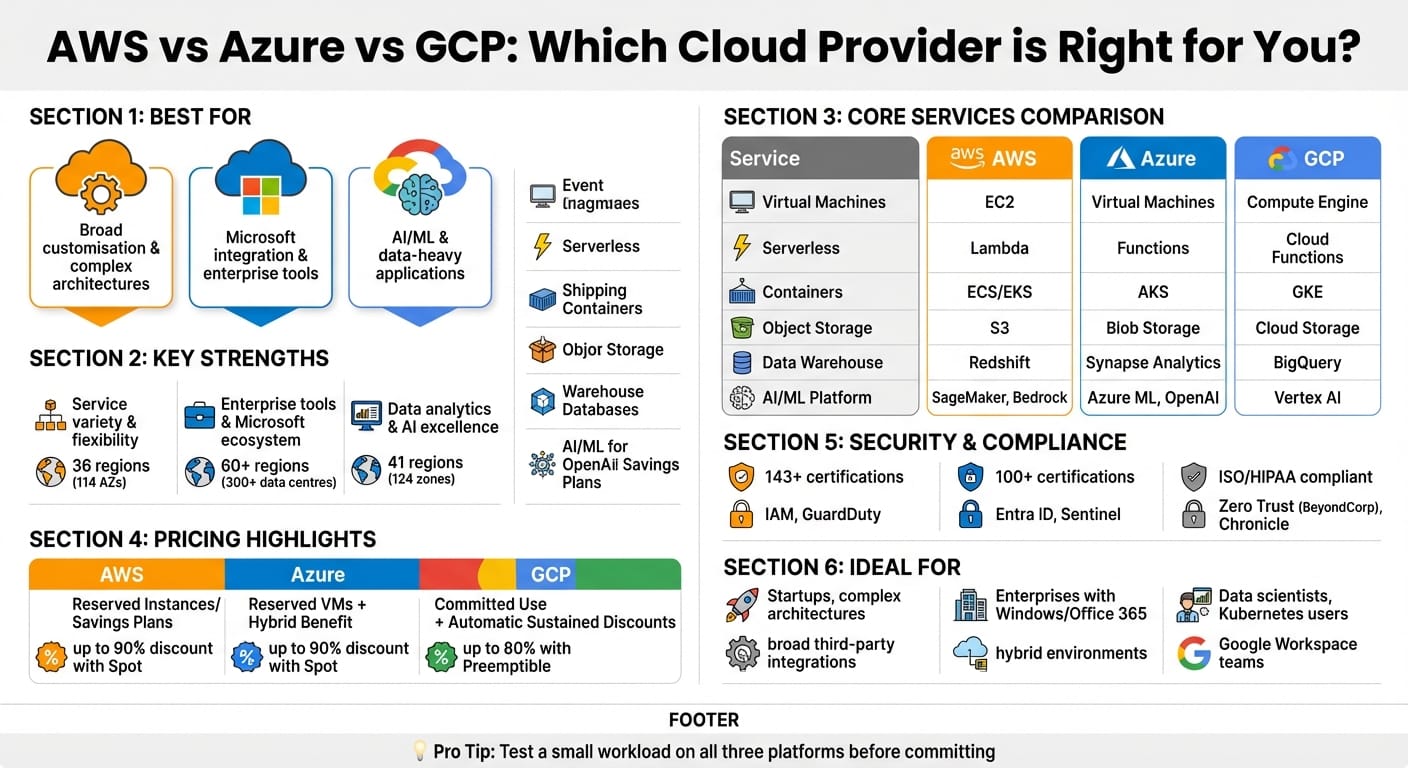
AWS vs Azure vs GCP: Complete Cloud Provider Comparison Chart
AWS vs Azure vs Google Cloud: Comparing The Big 3 Platforms | Keyhole Software
Step 1: Define Your Business and Technical Needs
When selecting a cloud provider, it’s essential to align their offerings with your organisation’s specific needs. This means considering your workload requirements, compliance obligations, and technical infrastructure.
Define Your Workload Requirements
Start by identifying what kind of control and functionality your workloads demand. For example:
- If you need full control over your infrastructure, opt for IaaS solutions like AWS EC2 or Azure VMs.
- For a developer-focused environment that simplifies code deployment, PaaS options such as AWS Elastic Beanstalk or Google App Engine are ideal.
- Handling unstructured data? Object storage services like AWS S3, Azure Blob Storage, or Google Cloud Storage are great options.
- For structured data, consider managed database services like Amazon RDS or Google Cloud SQL.
If you’re working with hybrid environments, look into tools like AWS Outposts, Azure Arc, or Google Anthos to ensure seamless integration. For tasks requiring heavy data processing or machine learning, specialised tools like Google Vertex AI or AWS SageMaker can be a game-changer [7].
Once you’ve nailed down these technical requirements, it’s time to tackle compliance and data residency challenges.
Compliance and Regional Data Requirements
For UK organisations, compliance with GDPR and data residency regulations is non-negotiable. This means choosing providers with data centres in the UK or the European Economic Area (EEA). For instance, Azure operates across more than 60 global regions and boasts 126 availability zones, making it a strong choice for public sector organisations like the NHS [6].
However, storing data in the UK doesn’t entirely shield you from international legal complexities. Under the U.S. CLOUD Act, American authorities could request data, potentially clashing with GDPR Article 48 [10]. Non-compliance with GDPR could lead to hefty fines of up to €20 million or 4% of your annual global revenue - whichever is higher [9][11].
To reduce these risks, consider strategies like:
- Customer-managed encryption keys or a Bring Your Own Key (BYOK) model: If your encryption keys remain under your control within the EU, even a U.S. warrant cannot compel the provider to decrypt your data.
- Ensuring the provider has reputable certifications such as SOC 2, ISO 27001, or CSA STAR Level 1.
- Establishing clear Data Processing Agreements (DPAs) that outline responsibilities in the event of a breach.
- Conducting Data Protection Impact Assessments (DPIAs), especially for cloud deployments involving high-risk personal data.
Step 2: Compare Core Services
Once you've nailed down your business and compliance needs, the next step is to look at what each cloud provider offers in terms of core services. This is where you match your technical requirements to their capabilities. The way these services handle compute, storage, networking, and advanced features like AI/ML can have a huge impact on how well your systems perform and how smoothly they operate. AWS, Azure, and GCP each have their own strengths in these areas, so let’s dig in.
Compute, Storage, and Networking
When it comes to compute, AWS stands out with its extensive EC2 instance options, solid serverless offerings like Lambda, and a well-established global infrastructure. Azure, on the other hand, has a strong focus on enterprise-level virtual machines, particularly for businesses already tied into Windows or SQL Server. GCP shines in containerisation, offering advanced Kubernetes support through GKE and the flexibility of custom machine types, which let you fine-tune CPU and RAM ratios to suit your needs.
For storage, AWS S3 has become the go-to for object storage - it’s practically the benchmark. Azure Blob Storage is a great fit for handling large-scale unstructured data, with seamless integration into Azure Data Lake. Meanwhile, GCP Cloud Storage has a nifty feature called Autoclass, which automatically shifts data between storage tiers based on how often it’s accessed. This can help cut costs without you having to lift a finger [15].
Networking is where GCP really flexes its muscles. Its global fibre network and Global VPCs make multi-region deployments easier compared to the regional VPC setups offered by AWS and Azure. In fact, some benchmarks show GCP’s IaaS delivering about 10% better I/O throughput at lower costs [15]. AWS also brings custom silicon into the mix with its Graviton processors for compute and Inferentia chips for AI workloads, which can give you a performance edge [13].
AI/ML and Advanced Services
If AI and machine learning are big parts of your strategy, you’ll want to carefully evaluate what each provider brings to the table. Their flagship platforms - AWS SageMaker, Azure Machine Learning, and GCP Vertex AI - each cater to different needs. GCP is often seen as a leader in data analytics and AI, especially for projects that rely on tight data integration. Azure, thanks to its partnership with OpenAI, is a strong contender for generative AI projects using models like GPT-4 or DALL-E [17]. AWS offers a solid ML infrastructure, bolstered by custom hardware like Trainium and Inferentia chips for large-scale training and inference tasks [13].
"Google Cloud launched over 1,000 new products and features in eight months." - Sundar Pichai, CEO, Alphabet [15]
All three providers now offer their own AI accelerators: AWS has Trainium and Inferentia, Azure has Maia, and GCP has Tensor Processing Units (TPUs) [13]. If your team is already steeped in open-source tools like TensorFlow or Kubernetes, GCP’s native support might make your life easier. For businesses deeply tied into Microsoft’s ecosystem - think Teams, Office 365, and so on - Azure’s integration is second to none. And if you’re after a broad toolset with loads of third-party integrations, AWS SageMaker is a strong option.
Core Services Comparison Table
| Service Category | AWS | Azure | GCP |
|---|---|---|---|
| Virtual Machines | EC2 | Virtual Machines | Compute Engine |
| Serverless | Lambda | Functions | Cloud Functions |
| Containers | ECS / EKS | AKS | GKE |
| Object Storage | S3 | Blob Storage | Cloud Storage |
| Block Storage | EBS | Disk Storage | Persistent Disk |
| Data Warehouse | Redshift | Synapse Analytics | BigQuery |
| AI/ML Platform | SageMaker, Bedrock | Azure Machine Learning, OpenAI | Vertex AI |
| Networking | VPC / Direct Connect | Virtual Network / ExpressRoute | VPC / Cloud Interconnect |
| Regions | 36 (114 AZs) | 60+ (300+ data centres) | 41 (124 zones) |
This table gives you a clearer picture of where each provider excels, making it easier to line up their strengths with your priorities. Before you dive in and commit to one, it’s worth running a test workload - like web serving or analytics - on all three platforms. This will give you a real-world sense of their performance and cost [16]. If you’re a smaller team, though, sticking with one provider’s managed services might be a smarter move than juggling multiple clouds. For startups needing help with these high-level architectural decisions, a fractional CTO can provide the necessary technical leadership.
Step 3: Review Pricing and Cost Management
Once you've nailed down your technical requirements and identified your core services, it's time to tackle pricing. For UK startups and SMEs, keeping costs under control is absolutely crucial. By understanding the pricing models and tools available, you can avoid nasty surprises and make the most of your budget. Let’s dive into the details.
Pricing Models Explained
All three major cloud providers - AWS, Azure, and GCP - use a pay-as-you-go billing system. This means you’re only charged for what you actually use, calculated down to the second. Sounds great, right? But there’s a catch: if you’re not keeping a close eye on usage, those costs can spiral. One sneaky expense to watch out for is data egress fees - essentially what you pay to move data out of the provider’s network. For AWS and Azure, this typically ranges from £0.04 to £0.07 per GB [18].
For businesses with predictable workloads, commitment-based discounts can be a game-changer. Here’s a quick breakdown:
- AWS offers Reserved Instances and Savings Plans, which can save you up to 72% over one- or three-year commitments [8].
- Azure has a similar setup with Reserved VM Instances and also offers the Azure Hybrid Benefit, allowing you to reuse existing Windows Server and SQL Server licences. This can slash costs significantly - sometimes making Azure up to five times cheaper than AWS for Windows-based tasks [8].
- GCP takes a slightly different route with Committed Use Contracts and Sustained Use Discounts, automatically applying savings of up to 30% for workloads running consistently throughout the month [14].
For workloads that can handle interruptions - like data processing or testing - Spot Instances (AWS), Spot VMs (Azure), and Preemptible VMs (GCP) are worth considering. These options can cut costs dramatically, with savings of up to 90% on AWS and Azure, and up to 80% on GCP [13][14].
And let’s not forget free tiers. AWS and Azure both offer 12 months of free services plus "always free" options, while GCP provides a £240 credit (roughly $300) to help you get started [8][14].
"Companies have largely finished cost optimisation and are now focusing on new initiatives, which is expected to drive AWS spending on AI infrastructure." - Andy Jassy, CEO, Amazon [15]
Once you’ve got a handle on pricing, use the providers’ cost management tools to fine-tune your spending.
Cost Management Tools
Each provider offers tools to help you monitor and optimise your expenses. Here’s a quick overview:
- AWS: Tools like Cost Explorer and Budgets let you visualise costs and set custom alerts (e.g., at 50%, 75%, and 90% of your budget). For more precise recommendations, Compute Optimizer uses machine learning to suggest how to right-size your resources.
- Azure: With Cost Management + Billing, you can track spending and get personalised tips from Azure Advisor - like shutting down idle resources or resizing VMs. If you’re already using Microsoft licences, this makes it easier to manage cloud and on-premises costs together.
- GCP: Cloud Billing provides detailed reports, while the Recommender tool offers automated suggestions to cut waste, such as deleting unused storage or resizing VMs. You can also set up alerts with Cloud Billing Budgets to avoid overspending.
Pro tip: automate alerts and review your spending weekly. Keep an eye on those pesky egress fees - they can add up fast [18].
Pricing Comparison Table
Here’s a side-by-side look at the key features of each provider:
| Feature | AWS | Azure | GCP |
|---|---|---|---|
| Primary Discount Model | Reserved Instances / Savings Plans | Reserved VM Instances | Committed Use / Sustained Use |
| Max Compute Discount | Up to 90% (Spot) | Up to 90% (Spot) | Up to 80% (Preemptible) |
| Hybrid Benefit | Limited (AWS Outposts) | Extensive (Azure Hybrid Benefit) | Limited |
| Free Tier | 12 months + Always Free | 12 months + Always Free | £240 Credit + Always Free |
| Cost Management Tool | AWS Cost Explorer | Azure Cost Management | GCP Cloud Billing |
| Automatic Discount | No (Manual RI/Savings) | No (Manual RI) | Yes (Sustained Use) |
Before committing to a provider, take advantage of their pricing calculators - AWS Pricing Calculator, Azure Pricing Calculator, and GCP Pricing Calculator - to estimate costs based on your specific workloads and regions [14]. If you’re a UK startup, explore credit opportunities through programmes like AWS Activate or Azure for Startups. These can help offset costs while you get your projects off the ground.
Step 4: Check Integration, Security, and Ecosystem Compatibility
Once you’ve got a handle on cost management, the next step is to ensure your cloud provider ticks all the boxes for security and integration. Let’s dive into the key areas you need to evaluate.
Security and Compliance
All three major cloud providers - AWS, Azure, and GCP - take security seriously, but each has its own style and strengths.
AWS offers fine-grained control with tools like IAM (Identity and Access Management) and AWS Organizations, which allow you to set up scalable, hierarchical permissions for large teams. As Werner Vogels, CTO of AWS, famously said:
"IAM is the single AWS service that touches every single aspect of the Everything Cloud" [19].
They also use GuardDuty, which leverages machine learning for real-time threat detection.
Azure is a natural choice if you’re already using Microsoft products. Its Microsoft Entra ID (formerly Azure AD) integrates seamlessly with Windows Server and Office 365, making it a strong fit for enterprises reliant on Microsoft’s ecosystem. Azure also offers Sentinel, an advanced SIEM (Security Information and Event Management) tool for hybrid environments, and simplifies encryption for Windows-heavy workloads.
GCP, on the other hand, is all about privacy and cutting-edge security models. By default, all data is encrypted at rest, and its Zero Trust approach is spearheaded by BeyondCorp. GCP’s Security Command Center and Chronicle use AI to detect threats, making it a strong contender for organisations with data-heavy or API-driven workloads.
When it comes to certifications, all three providers support major standards like ISO 27001, SOC 2, and HIPAA. AWS leads with 143 security standards, while Azure offers over 100 certifications, including 35 tailored to industries like healthcare and finance [14]. If your business has strict data sovereignty requirements - such as those in the EU or Saudi Arabia - you might want to look at GCP’s Sovereign Controls or Azure’s Cloud for Sovereignty [12]. For highly sensitive workloads, services like AWS Nitro Enclaves or Azure Confidential Computing are worth considering, as they process data in isolated environments [1] [12].
Ecosystem and Interoperability
Your current tech stack plays a massive role in deciding which provider fits best.
If you’re already running Microsoft 365, Teams, or Windows Server, Azure is the obvious choice. It’s also adapting to open-source needs, with 40% of Azure’s virtual machines now running Linux [20]. Plus, Azure’s Hybrid Benefit lets you reuse existing licences, which can save you a bundle on Windows and SQL Server workloads.
For teams that rely on Google Workspace, Kubernetes, or open-source tools, GCP is a no-brainer. Google pioneered Kubernetes, and its GKE (Google Kubernetes Engine) is often considered the most mature managed Kubernetes service [21]. A real-world example? In 2023, Dataquest migrated to GKE and Cloud SQL to boost performance and reduce latency for its learners [5].
AWS, meanwhile, is the jack-of-all-trades. It offers the broadest third-party integration and has the largest talent pool, making it a popular pick for startups and businesses that need flexibility. Netflix, for instance, runs almost entirely on AWS, using Amazon S3 for its massive content library and EC2 for scalable compute power to serve millions of viewers worldwide [5] [21].
For hybrid or multi-cloud environments, you’ve got options like Azure Arc, AWS Outposts, and Google Anthos [5] [22] [14]. If you’re connecting multiple clouds, try to pick regions that are geographically close to reduce latency and cut down on data transfer costs [23] [24].
To avoid vendor lock-in, focus on using REST APIs and containerisation tools like Docker and Kubernetes to keep your workloads portable [21]. Running pilot projects on multiple providers can help you gauge ease of use, documentation quality, and integration reliability before committing [21].
Security and Ecosystem Comparison Table
Here’s a quick side-by-side comparison of the three providers:
| Feature | AWS | Azure | GCP |
|---|---|---|---|
| Identity Management | IAM, AWS Organizations | Entra ID (Azure AD), Conditional Access | IAM, BeyondCorp Zero Trust |
| Threat Detection | GuardDuty, Inspector | Sentinel, Defender for Cloud | Chronicle, Security Command Center |
| Compliance Portal | AWS Artifact | Service Trust Portal | Assured Workloads |
| Encryption | KMS, CloudHSM | Key Vault, Dedicated HSM | Cloud KMS, Cloud HSM |
| Ecosystem Fit | Broadest 3rd-party support | Microsoft 365, Teams, Windows | Google Workspace, Kubernetes |
| DDoS Protection | AWS Shield | Azure DDoS Protection | Google Cloud Armor |
| Managed Kubernetes | EKS | AKS | GKE |
| Hybrid Management | AWS Outposts | Azure Arc / Stack | Anthos |
| Compliance Certs | 143+ [14] | 100+ [14] | Numerous (ISO, HIPAA, etc.) [14] |
Before you lock in your choice, test how each provider’s native security tools - like AWS Shield or Google Cloud Armor - work with your existing WAF (Web Application Firewall) or CI/CD pipelines [19] [21]. A hands-on trial will give you a better sense of how things work in practice and help you avoid unexpected issues later.
Step 5: Consider Support, Lock-in Risks, and Long-term Fit
After sorting out security and integration concerns, it's time to tackle support, vendor lock-in, and how well the solution aligns with your long-term goals.
Support Tiers and Options
Support can make or break your cloud experience, and each provider handles it a bit differently.
AWS assigns Technical Account Managers (TAMs) to guide you, offering support tiers from Developer to Enterprise. They back this with a 99.99% uptime SLA [4].
Azure, on the other hand, leans into structured escalation processes. Their account management system tracks issues across multiple subscriptions, which is great if you're deeply tied into Microsoft's ecosystem. They offer support levels such as Developer, Standard, Professional Direct, and Unified, with uptime SLAs ranging from 99.9% to 99.99% [25][4].
GCP takes a collaborative approach, borrowing Site Reliability Engineering (SRE) principles. They focus on Service Level Objectives (SLOs), automated reliability, and thorough postmortems. Their Standard, Enhanced, and Premium tiers are designed for data-heavy teams, with SLAs ranging from 99.5% to 99.99% [4][25].
"The functional gap between AWS, Azure, and GCP has largely closed. The difference now lies in the operational tax they levy on your teams." [25]
For critical workloads, don’t just take their word for it - test their response times during your trial period. A hands-on evaluation will give you a much clearer picture than glossy marketing brochures ever could.
Reducing Vendor Lock-in
Once you're in, leaving can feel like trying to claw your way out of a black hole. Proprietary technologies like AWS DynamoDB or Azure Cosmos DB often have no direct equivalents elsewhere, making migration tricky. Add to that hefty data egress fees and the cost of re-engineering, and you’ve got a recipe for being stuck.
To sidestep this trap, stick to open standards and portable databases like PostgreSQL or MySQL. Kubernetes is another lifesaver - companies using Kubernetes automation platforms report saving an average of 63% on cloud bills [26]. You can also adopt approaches like Hexagonal Architecture to keep your core code separate from vendor-specific infrastructure, making it easier to switch providers down the line.
And don’t just plan your entry strategy - test your exit too. Run reversibility drills to estimate how long and how much it would cost to migrate. Keep an eye on data egress fees, as these can be a hidden "tax" that makes leaving prohibitively expensive.
When negotiating your enterprise agreements, push for price caps and ensure you can retrieve your data in usable formats.
"Once you're in, getting out is like trying to escape a black hole." [27]
Provider Alignment Decision Matrix
When it comes to long-term fit, you'll want to evaluate how well each provider aligns with your strategic needs. Here’s a quick comparison:
| Strategic Pillar | AWS | Azure | Google Cloud |
|---|---|---|---|
| Best Fit For | Independent product teams and modular services | Central platforms with Microsoft identity/policy | Data-led teams with ML workflows |
| Governance | Decentralised ownership with guardrails | Tenant-wide policy and audit consistency | Zero-trust perimeters and data boundaries |
| Resilience | Deep multi-AZ patterns and cross-region failover | Enterprise interconnect and coordinated recovery | Global load balancing on low-latency backbone |
| Financial Model | Flexible commitment paths; granular allocation | Integrated with EA constructs and governance | Clear unit economics and automatic discounts |
Before jumping in, map out a 12-18 month roadmap alongside a 3-5 year vision. This way, you’ll ensure the provider you choose not only meets your immediate needs but also aligns with your future ambitions [28].
"Choose the cloud that fits the team you actually have, not the one you wish you had." [25]
For more tailored advice on aligning your cloud strategy with your business goals, consider reaching out to a CTO-led technology partner like Metamindz (https://metamindz.co.uk).
Conclusion: Choosing the Right Cloud Provider
Picking the right cloud provider - whether it's AWS, Azure, or GCP - comes down to aligning their offerings with your specific needs. By now, you should have a checklist that includes your technical, security, and compliance essentials. This checklist will be your compass in navigating the decision-making process.
Start by nailing down your requirements. What are your technical must-haves? Do you have particular security or data governance needs? Once these are clear, you can stack providers side by side and make an informed comparison[3]. Taking a structured, step-by-step approach here can save you headaches down the road and lead to better results[29].
It's not always about who has the most features; it's about what fits your ecosystem best. For instance:
- Azure is a natural fit if you're deep into Microsoft's tools and services.
- GCP shines with data-heavy applications and containerised workflows.
- AWS? It’s the go-to for complex, multi-layered architectures, offering a massive range of services[30][8].
But don't just think short-term. Look at each provider's development roadmap and ask yourself: does it align with your immediate goals and your vision for the future[3]? This kind of forward thinking ensures your choice supports both where you are now and where you're headed.
"Choosing the right cloud provider is a major strategic move that can shape your company's future." - DoiT International[2]
If you're feeling overwhelmed, you're not alone. It's easy to overlook hidden costs like data egress fees or to mismanage resources - leading to wasted budgets (up to 30% in some cases!)[31]. This is where expert advice can make a difference. A tech-savvy partner like Metamindz can help you cut through the complexity. From evaluating SLAs to spotting hidden expenses, they’ll make sure your choice is solid - both for today and for the long haul.
FAQs
What should I consider when choosing between AWS, Azure, and GCP?
When choosing between AWS, Azure, and GCP, it’s crucial to match the platform to your organisation’s specific needs. Let’s break it down into a few key areas:
- Service offerings and compatibility: AWS stands out with its massive range of services and an extensive global infrastructure, making it a solid choice for varied and complex requirements. Azure, on the other hand, is a no-brainer if your organisation already relies heavily on Microsoft products like Office 365 or Windows Server. Meanwhile, GCP shines in areas like data analytics, AI tools, and workloads that demand ultra-low latency.
- Costs and pricing structure: The pricing models across these platforms can feel like comparing apples to oranges. AWS offers significant savings if you can predict your usage patterns. Azure might be the more budget-friendly option for businesses already using Microsoft licences, as it provides discounts for those. GCP’s pricing is particularly appealing for long-running workloads, thanks to its discounts and lower data transfer fees.
- Security and compliance: All three providers meet global standards, but the tools and features they offer for security differ. Think about your industry’s compliance needs - whether it’s GDPR, ISO 27001, or something else - and see which platform ticks the right boxes for you.
Still not sure which platform suits your goals? That’s where Metamindz can help. Through their fractional CTO sessions, they provide tailored advice to ensure your chosen platform aligns perfectly with your technical and business needs. Their hands-on approach helps you find scalable solutions and ensures smooth integration into your workflows.
How do AWS, Azure, and GCP pricing models compare?
When it comes to pricing, AWS, Azure, and GCP all stick to a pay-as-you-go approach, but they each have their own ways of rewarding long-term or predictable usage.
AWS offers a lot of flexibility with its pricing discounts. You can save money through Reserved Instances or Savings Plans, which let you commit to using resources for 1 or 3 years. If you're looking to cut costs further, Spot Instances let you use unused capacity at a lower price. Plus, their tiered pricing system means the more you use, the less you pay per unit.
Azure leans into options like Reserved VM Instances and Spot VMs for savings, while also catering to larger organisations with Enterprise Agreements that cover organisation-wide usage. A standout feature is its hybrid benefit, which lets you apply your existing on-premises licences to Azure, helping to reduce costs significantly.
GCP takes a slightly different route. Its Sustained-Use Discounts automatically kick in when you run workloads continuously, saving you money without needing extra effort. For predictable usage, Committed-Use Contracts offer discounts if you commit to a certain level of usage. GCP also keeps costs down with Preemptible VMs, great for temporary or flexible tasks, and tends to have lower data egress fees compared to the others.
To sum it up, AWS emphasises reserved and spot options for flexibility, Azure combines enterprise-level agreements with hybrid licensing perks, and GCP keeps things simple with automatic discounts and easy-to-understand commitments.
What are the main security features of AWS, Azure, and GCP?
When it comes to security, AWS, Azure, and GCP all operate under a shared responsibility model, but they each bring their own set of tools to help safeguard identity, data, networks, and protect against threats. Let’s break it down.
AWS offers a range of security features, starting with Identity and Access Management (IAM) for fine-grained permission control. For encryption, there’s Key Management Service (KMS), while AWS Shield provides protection against DDoS attacks. For monitoring and threat detection, you’ve got GuardDuty. AWS also supports key compliance frameworks like GDPR and HIPAA, making it a strong choice for industries with strict regulations.
Azure takes a similar approach, with Azure Active Directory (AD) for managing access and identities. Encryption needs are covered by Key Vault, and Microsoft Defender for Cloud provides integrated monitoring to detect threats. On the network security side, Azure Firewall and DDoS Protection add extra layers of defence. Like AWS, Azure has a broad range of compliance certifications, including GDPR and HIPAA.
GCP focuses on role-based access with Cloud IAM, while its Confidential Computing feature takes encryption to the next level by protecting data even during processing. For monitoring and threat detection, there’s the Security Command Center, and Cloud Armor helps with DDoS protection. GCP also ticks the GDPR and HIPAA compliance boxes, making it a solid option for organisations with strict data privacy needs.
All three platforms deliver strong encryption - whether data is at rest, in transit, or increasingly during use - and meet the compliance requirements for organisations in the UK and Europe. Whether you’re in finance, healthcare, or any other regulated industry, these cloud providers have the tools to help you stay secure.