
Customising Agile Roles for Distributed Teams
- Mapping Agile Roles to Distributed Team Structures
- How to Adapt Agile Roles for Distributed Teams
- Governance and Communication for Distributed Agile Roles
- Role related challenges- from Scrum @ Scale- Distributed Agile Team Collaboration Webinar
- Step-by-Step Guide: Redesigning Agile Roles for Distributed Teams
- Conclusion
- FAQs
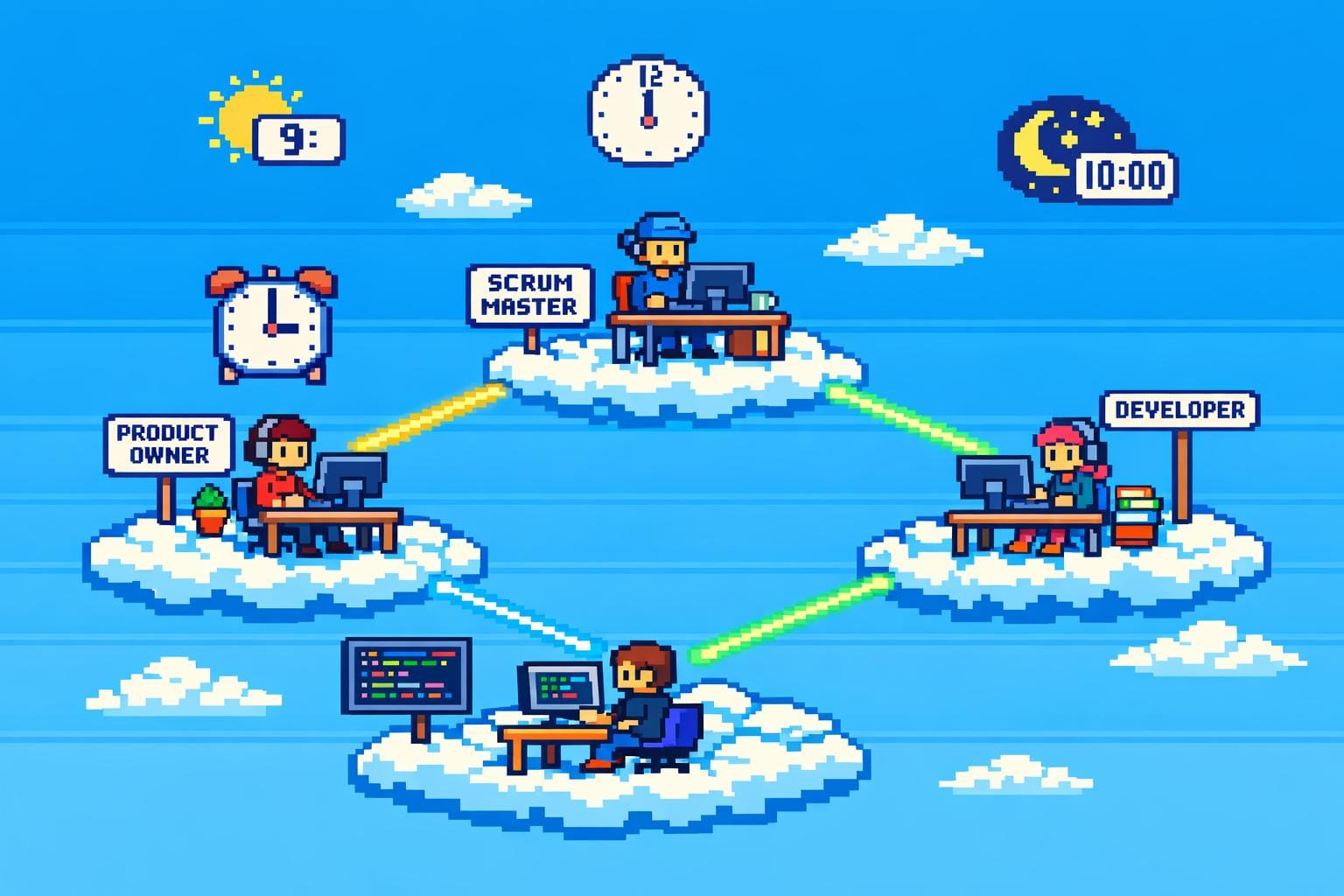
Customising Agile Roles for Distributed Teams
Distributed Agile teams - where team members work across different locations - face unique challenges compared to those in a single office. These include time zone delays, reduced spontaneous collaboration, and cultural differences. To overcome these hurdles, Agile roles like Product Owners, Scrum Masters, and Developers need to be reworked for better communication and efficiency.
Key Takeaways:
- Product Owners: Need structured communication, centralised documentation, and regular check-ins.
- Scrum Masters: Should focus on cross-time-zone collaboration, use tools like virtual whiteboards, and rotate meeting times to ensure fairness.
- Developers: Encouraged to develop broader skills and use cross-location code reviews to maintain quality and knowledge sharing.
Practical tips include:
- Use "golden hours" (shared working hours) for key meetings.
- Document everything in shared tools like Confluence or SharePoint.
- Create role charters to clarify responsibilities and communication expectations.
- Modularise team responsibilities to reduce dependencies across locations.
Mapping Agile Roles to Distributed Team Structures
Core Agile Roles and Their Responsibilities
In Agile, the Product Owner, Scrum Master, and Developers are the backbone of any team. But when teams are scattered across different locations, their responsibilities naturally need some tweaking. The Product Owner focuses on managing the backlog, setting priorities, and ensuring the team delivers value to customers. The Scrum Master keeps Agile practices on track by facilitating ceremonies, removing obstacles, and guiding the team. Meanwhile, Developers handle the nitty-gritty - designing, building, testing, and delivering functional software. These roles were originally designed with co-located teams in mind, so when you throw in different time zones and locations, you’ll need to rethink how they work together. The challenge lies in redistributing role ownership so it works seamlessly across dispersed teams, often requiring fractional CTO leadership to align technical strategy with distributed operations.
Distributing Role Ownership Across Locations
One way to tackle this is by creating a "Product Owner team" - a group of Product Owners who collaborate on scope and prioritisation for a product line. This setup allows them to share facilitation duties across distributed squads, avoiding bottlenecks at any single location [1].
Another critical adjustment is empowering team members to make decisions within their specific areas of responsibility. This avoids delays caused by waiting on approvals from someone halfway across the globe [7][8]. For example, you could divide backlog ownership - say, the London team takes charge of the mobile app backlog, while the Berlin team focuses on the API layer. To maintain quality, cross-location code reviews are a great idea. They prevent knowledge from being locked into one office and ensure that any team can step in if an issue pops up while the primary team is offline [2][5].
Creating Role Charters
Once roles are distributed, formalising them through role charters is a smart move. A role charter is essentially a guide that spells out a role’s purpose, decision-making authority, and communication expectations. For instance, a distributed Product Owner’s charter might include: "Manages the product backlog for the customer portal; makes final prioritisation decisions; holds weekly one-on-one check-ins with each squad; available on Slack from 10:00-14:00 GMT for urgent queries." Similarly, a Scrum Master supporting teams in the UK and EU could have a charter like: "Leads sprint planning and retrospectives; rotates meeting times monthly to balance time zone challenges; documents all ceremony outcomes in Confluence within 24 hours."
To keep things clear and accessible, these charters should be stored in shared tools like Confluence or SharePoint. This way, everyone knows exactly who’s responsible for what and how to get in touch. It’s a simple step, but it can eliminate the classic "I thought you were handling that" confusion that often trips up distributed teams. Transparency is your best friend when working across locations.
How to Adapt Agile Roles for Distributed Teams
Adapting Product Ownership
When teams are spread across different locations, Product Owners have to swap those quick, informal chats in the office hallway for something more structured. Every decision - whether it's about priorities, backlog updates, or scope changes - needs to be documented and shared in a centralised system, like a wiki or a content management tool. As Atlassian puts it:
"The first challenge is training the team to understand that, when decisions are made, they need to be communicated... Communicate even minute details until both offices find a healthy groove" [2].
Think of the Product Backlog as your team's single source of truth. It’s got to be up-to-date, crystal clear, and well-organised to avoid unnecessary confusion or wasted effort. One way to make life easier is by assigning specific components to specific offices. For example, one team could focus on the mobile app while another handles the API layer. This modular approach cuts down on the back-and-forth between time zones and gives teams the freedom to make decisions independently.
Another trick is to figure out your "golden hours" - those precious few hours where all teams have overlapping working times. Use this window for the most important syncs and handovers. You can also sprinkle in quick five-minute check-ins during the week to tackle any blockers without dragging everyone into long meetings. And instead of obsessing over hours worked, shift your focus to real outcomes, like completed user stories, customer feedback, and product quality.
Finally, schedule additional stakeholder discussions outside the usual sprint ceremonies. This helps you stay in tune with external needs and keeps everyone on the same page. These practices set the stage for Scrum Masters to tackle the unique challenges of distributed teams.
Adjusting Scrum Master Responsibilities
Scrum Masters in distributed teams need to be champions of cross-time-zone collaboration. Those "golden hours" we mentioned earlier? They’re gold for a reason - use them wisely for key meetings like stand-ups or sprint planning. To keep things fair, rotate meeting times so no one team is stuck with the awkward 11 pm slot every time. Sharing the load helps prevent burnout.
For updates outside of these meetings, leverage tools like messaging channels or bots to collect progress reports and flag issues asynchronously. In virtual meetings, a simple "pass the ball" system - where each speaker names the next - keeps things orderly and ensures remote team members feel included. As Santiago Comella-Dorda, Partner at McKinsey, points out:
"Working remotely, teams need to make a more conscious effort to be social, polite, precise, and tactful - to ensure everyone feels just as safe contributing remotely as they did in person" [6].
Since you lose those casual, in-person moments in a distributed setup, it’s the Scrum Master's job to make sure every decision, agreement, and architectural tweak is logged in a centralised wiki. Tools like Miro or Mural can help replicate physical whiteboards, capturing ideas as they come up. Increase the frequency of feedback sessions - daily or bi-weekly check-ins work well - to keep a pulse on team morale and motivation. And don’t forget to inject some fun into the mix. Virtual trivia nights or happy hours can go a long way in building trust and camaraderie among team members.
Managing Cross-Functional Teams and Specialist Roles
While Product Owners and Scrum Masters are busy fine-tuning communication and coordination, cross-functional teams also need to adjust to stay in sync. A smart way to organise distributed teams is by following a modular approach, similar to how software architecture works. Assign specific offices to handle specific components or technologies. This reduces the need for constant cross-time-zone collaboration and allows teams to work more independently.
When multiple locations are working on the same project, it’s crucial to define clear integration points and APIs. This ensures that handovers between teams are smooth and avoids any last-minute surprises. For specialist roles like security engineers or QA, cross-location code reviews can be a game-changer. They allow one team to maintain and support specialised code while the main developers are offline. Remote pair programming is another great way to build trust and share knowledge in real time.
To keep everyone aligned, establish a universal "Definition of Done" that applies to all teams. For instance, ensure that code is written, peer-reviewed, tested, and merged before it’s considered complete. When it comes to measuring productivity, focus on delivery outcomes, time spent in deep work, and code quality - ditch the old-school obsession with hours logged.
Finally, make onboarding a breeze for new team members by automating as much as possible. Provide a detailed "Getting Started" guide and set up automated development environments. Encourage personal connections through dedicated social channels or even introductory blogs. Building these relationships is key to creating a self-organising, effective distributed Agile team that thrives in this setup.
Governance and Communication for Distributed Agile Roles
Defining Decision-Making Paths
In distributed teams, you can’t rely on quick hallway chats or informal approvals anymore - everything needs to be documented and crystal clear. Decentralised decision-making is a game-changer here. Instead of funnelling every decision through one person or a central group, empower team members to make decisions within their areas of responsibility [7][8]. A great way to keep this organised is by using a RACI matrix (Responsible, Accountable, Consulted, Informed). This tool spells out who’s in charge of what - like who approves architectural changes, who gets a say in feature priorities (often guided by a fractional CTO), and who just needs to stay in the loop.
Since those casual in-person conversations don’t happen anymore, you’ll want to shift these discussions to shared platforms like wikis or content management systems [2]. For technical decisions, a "+1" voting system works well - it keeps things accountable without slowing everything down. Pairing this with a RACI matrix and documented approvals creates a transparent governance setup. It gives teams the freedom to move quickly while staying aligned, laying the groundwork for adapting Agile ceremonies to a distributed environment.
Adapting Agile Ceremonies for Distributed Teams
Once governance is sorted, the next step is tweaking Agile ceremonies to fit distributed workflows. Start by figuring out your "golden hours" - those precious overlapping hours when everyone’s online - and reserve them for the most important live meetings [2]. To keep things fair, rotate meeting times so no one’s stuck with late nights or early mornings all the time [2][9].
For teams with no overlapping hours at all, asynchronous stand-ups are a lifesaver. Use messaging tools or bots to collect updates and flag blockers without needing a live call [6]. During video meetings, keep a "back channel" chat open for quick votes, sharing links, or troubleshooting if someone’s audio cuts out [1]. And if a meeting runs longer than 90 minutes, schedule a quick break - it’s a simple way to avoid burnout and keep everyone focused [6].
Cross-Team Alignment and Metrics
When you’ve got multiple distributed teams, keeping everyone on the same page is no small feat. Scaled events like Scrum of Scrums are a solid way to sync up. These sessions let representatives from each team tackle dependencies, address blockers, and align on shared goals. To keep things running smoothly, assign clear accountability for key metrics - think lead time, code quality, and customer outcomes, rather than just tracking hours worked [8].
A shared "Definition of Done" is another must-have. It ensures all teams are on the same wavelength when deciding if a task is truly complete [2]. To top it off, use a centralised digital workspace like Confluence, SharePoint, or a wiki. This is where you document standards and keep everything open - task boards, chat histories, decision logs, you name it. It’s all about visibility. When everyone can see what’s going on, you get accountability without disrupting the flow of work [1][2][6]. These steps not only make cross-team collaboration easier but also strengthen the governance framework for distributed teams.
Role related challenges- from Scrum @ Scale- Distributed Agile Team Collaboration Webinar
Step-by-Step Guide: Redesigning Agile Roles for Distributed Teams
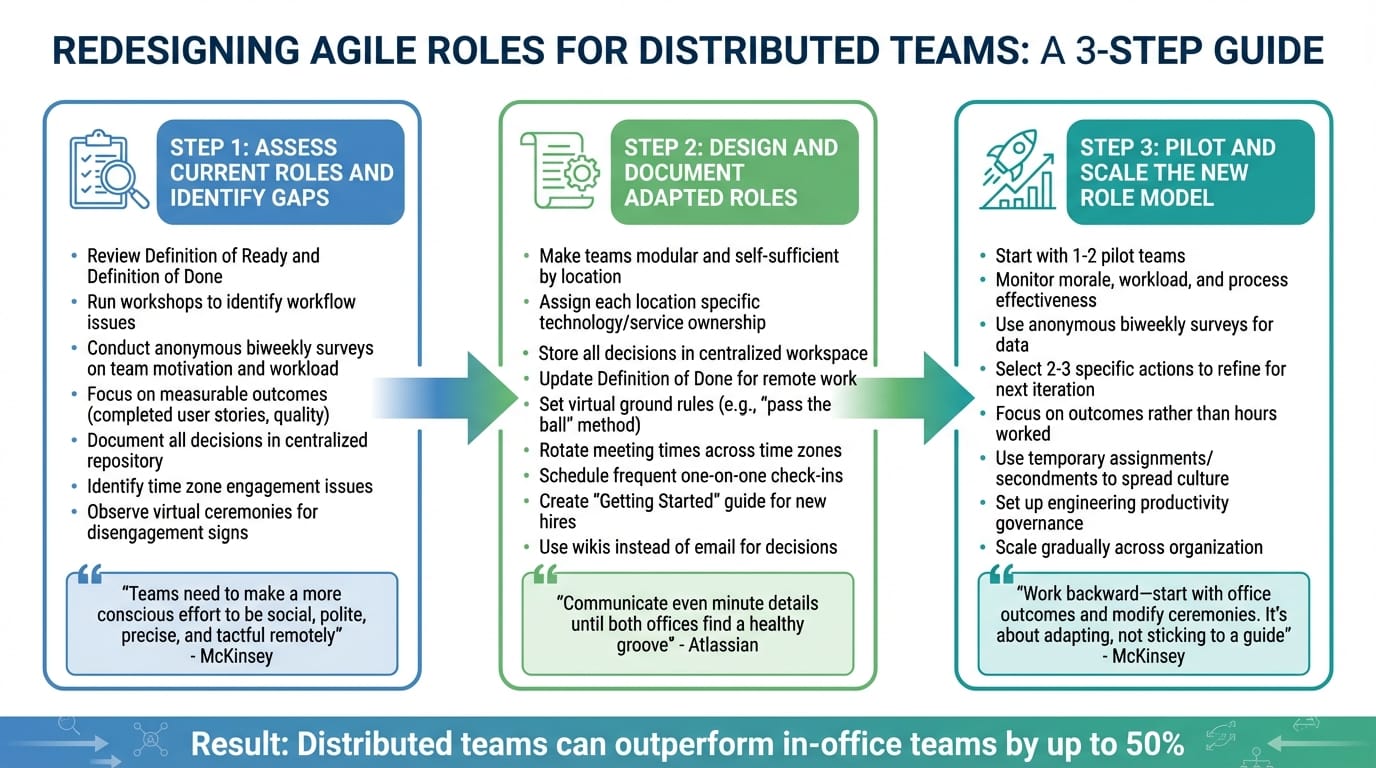
3-Step Guide to Redesigning Agile Roles for Distributed Teams
Step 1: Assess Current Roles and Identify Gaps
Before diving into changes, take a good look at your current setup. Are your agile practices holding up in a distributed environment? Review your Definition of Ready and Definition of Done - are they helping or hindering your team’s remote work? Running workshops can help pinpoint workflow issues, and anonymous biweekly surveys can give you a clear picture of team motivation, workload, and process effectiveness [6][9].
Focus on measurable outcomes, like completed user stories or the quality of delivered work, instead of just tracking hours worked [8]. And don’t forget about documenting decisions - having a centralised repository ensures nothing critical gets lost in the shuffle [2].
Time zone differences are another biggie. If people seem disengaged during meetings held at odd hours, that’s a warning sign [2][6]. Coaches can observe virtual ceremonies to catch subtle signs of disengagement, and you should verify that your tools can handle asynchronous collaboration effectively [3].
"Working remotely, teams need to make a more conscious effort to be social, polite, precise, and tactful - to ensure everyone feels just as safe contributing remotely as they did in person." - McKinsey [6]
Once you’ve identified the problem areas, you’re ready to start adapting roles to tackle these distributed challenges.
Step 2: Design and Document Adapted Roles
With the gaps in mind, it’s time to rework roles to suit a distributed setup. Aim to make teams more modular and self-sufficient. Ideally, each location should own a specific piece of technology or service to reduce dependencies across time zones. Keep all decisions, meeting notes, and architectural agreements in a centralised workspace - this way, everyone has access to the same information [2][5][6].
Update your Definition of Done to reflect the realities of remote work. For instance, a task might only be considered "done" after the code is written, a pull request is created, peer-reviewed, and merged [2][5]. Set clear virtual ground rules, like using a "pass the ball" method to ensure everyone gets a chance to speak [6]. If your team spans multiple time zones, rotate meeting times to share the inconvenience of odd hours fairly [2][5].
"When moving from a co-located office to a distributed culture, communication becomes significantly harder... Communicate even minute details until both offices find a healthy groove." - Atlassian [2]
Roles like Scrum Master or Product Owner need to adapt too. They might need to schedule more frequent one-on-one check-ins to keep everyone aligned [6][8]. For new remote hires, create a Getting Started guide to make setting up their development environment a breeze. And ditch email for decision-making - use wikis instead so updates are accessible to everyone [2].
Documenting these changes gives you a clear framework to test out in the next phase.
Step 3: Pilot and Scale the New Role Model
Start small - pilot your redesigned roles with one or two teams before rolling them out across the organisation. During this phase, keep an eye on morale, workload, and how well processes are working. Based on what you learn, pick two or three specific actions to refine the model for the next iteration [6].
For example, a U.S. insurance company used anonymous biweekly surveys during their transition to remote work. This gave Scrum Masters and team leaders the data they needed to set benchmarks and improve team health [6].
As you scale, continue focusing on outcomes rather than hours worked - it’s a principle that holds up whether you’re piloting or expanding [8]. Temporary assignments, like secondments, can also help spread the new culture and expectations across teams [2]. To keep things on track, set up engineering productivity governance to ensure everyone agrees on how to improve as the new roles are adopted more widely [10].
"The trick is to work backward - start with the outcomes you were getting in the office and modify your scrum ceremonies as appropriate. It's all about adapting to the situation rather than sticking to a guide." - McKinsey & Company [6]
Conclusion
Shaping Agile roles to fit distributed teams is an evolving journey. It demands intentional communication, adaptability, and a willingness to refine collaboration methods as your team’s needs change. By crafting flexible team structures, aligning on what "done" means across time zones, and fostering clear accountability, you create a strong foundation for distributed teams to excel.
The secret lies in focusing on outcomes rather than clinging to rigid processes. As Arshpreet Kaur, Project Manager, aptly states:
"Agile is a culture, not a collection of guidelines or rules" [11].
This perspective is critical - what worked in an office setting won’t necessarily translate to a remote environment. Your Agile ceremonies, leadership styles, and role definitions need to adapt to the unique dynamics of distributed work. By doing so, you naturally steer towards fostering trust and prioritising team well-being.
Building psychological safety is key. Virtual social spaces, consistent check-ins, and assuming positive intent in written communication can go a long way in creating an environment where self-organising teams thrive. These efforts aren’t just feel-good initiatives; they’re practical steps towards making distributed teams more productive. In fact, studies suggest that distributed teams can outperform their in-office counterparts by up to 50% [4].
To navigate this transformation, external expertise can provide a major boost. For instance, Metamindz offers fractional CTO services starting at £2,750 per month. Their UK and Europe-based teams seamlessly integrate into your workflow, helping you rethink Agile roles, tackle technical debt, and ensure your architecture is ready to support distributed delivery.
Transitioning to a distributed Agile model isn’t without its challenges, but with clear roles, continuous refinement, and the right support, your teams can not only adapt but thrive - no matter where they’re located.
FAQs
How can Product Owners manage communication effectively across time zones in distributed teams?
Product Owners can make time-zone differences work in their favour by setting up a solid communication routine that takes advantage of overlapping hours. For instance, you could arrange short daily check-ins during shared working times and provide written updates for anyone unable to join. A centralised tool, like a backlog board or a wiki, can be a game-changer here. It keeps priorities, decisions, and progress in one place, so everyone can stay on the same page, regardless of when they're online.
For those hours when teams aren’t working simultaneously, the Product Owner can step in as a communication anchor, turning priorities into clear, actionable formats like user stories, acceptance criteria, or release plans. Tools with threaded chats or comment features are perfect for keeping conversations organised and avoiding endless back-and-forths. It’s also worth over-explaining your intent sometimes - using visual aids or diagrams can help fill in the gaps when you can’t rely on non-verbal cues.
To make things even smoother, working with a CTO-led service like Metamindz could be a smart move. They offer features like shared Slack channels, automated updates, and real-time previews, which fit right into your workflow. This kind of setup helps teams collaborate effectively across time zones without missing a beat when it comes to delivery.
How can Scrum Masters ensure fair meeting times for distributed teams?
Scrum Masters play a crucial role in making sure meeting schedules work fairly for distributed teams. One way to do this is by setting up a core overlap window - a time when most team members’ working hours overlap. Use this window for key Scrum ceremonies like sprint planning and retrospectives. To keep things fair, rotate the meeting times each sprint so no one region bears the brunt of inconvenient timing every time.
For those who can’t join live meetings, offer asynchronous alternatives. This could include shared digital boards for updates, recorded sessions, and detailed notes outlining action items. It’s a practical way to accommodate different time zones, public holidays, and personal schedules while keeping everyone in the loop.
Stick to time-boxed meetings and avoid scheduling optional discussions outside of working hours. This helps create predictable routines and shows respect for everyone’s work-life balance. If you’re looking for support, Metamindz can provide the right tools and frameworks to make these practices part of your team’s workflow.
How can developers ensure code quality and share knowledge effectively in distributed teams?
Maintaining code quality and encouraging knowledge sharing in distributed teams requires a blend of solid technical practices and deliberate collaboration. A good starting point is agreeing on a shared definition of 'done'. This should include automated tests - covering unit, integration, and contract testing - and be enforced through a continuous integration pipeline. Lightweight code review tools like GitHub or GitLab are great for ensuring every change is reviewed by at least one team member. For remote teams, pair programming can be made smoother with screen-sharing and joint editing tools, allowing developers to collaborate effectively, even from a distance.
To make knowledge sharing easier, set up a central hub for documentation. This could include wikis, design documents, and architectural decision records - all in one accessible place. This helps everyone stay informed about the reasoning behind decisions. Regular syncs, such as daily stand-ups, weekly demos, and retrospectives via video calls, are also key to keeping the team aligned and catching potential issues early. Another idea is to rotate a knowledge-sharing role within the team. This could involve leading workshops or presenting on specific topics, which helps break down silos and strengthens team connections.
For organisations aiming to refine these processes, Metamindz can lend a hand through their fractional CTO services. They specialise in standardising coding practices, recommending the right tools, and ensuring distributed teams across the UK and Europe maintain high-quality standards while working efficiently.