
Post-Incident Analysis: Best Practices
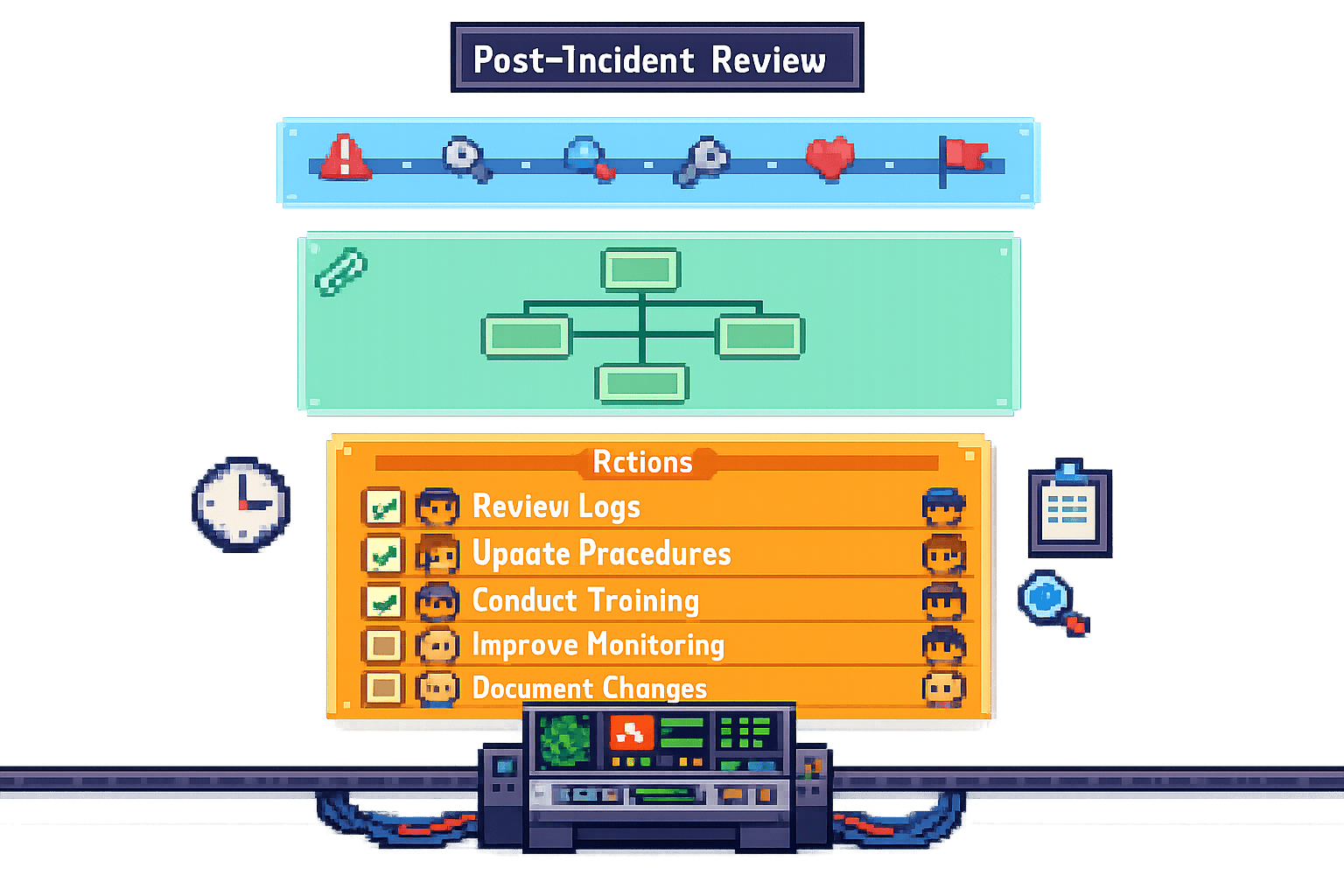
Post-Incident Analysis: Best Practices
When things go wrong with your systems, it’s not just frustrating - it’s expensive. Downtime costs around £4,200 per minute, and major incidents can hit nearly £600,000 each. Shockingly, 80% of these issues come from internal changes, and most aren’t spotted until users complain. That’s where post-incident analysis (or post-mortems) steps in. The goal? Understand what happened, why it happened, and how to stop it from happening again - without pointing fingers.
Here’s the gist:
- Blameless culture: Focus on fixing systems, not blaming people. Teams are 47% more likely to improve processes when they feel safe.
- Structure your reviews: Gather the right people, define clear objectives, and document everything fast (ideally within 48 hours).
- Root cause analysis: Use tools like the "5 Whys" or Fishbone diagrams to dig deeper into systemic issues.
- Actionable fixes: Assign tasks with clear owners and deadlines. Prioritise fixes by impact and urgency.
- Continuous improvement: Learn from trends, update processes, and track metrics like Time to Detect (TTD) and Time to Resolve (TTR).
The bottom line? Post-incident reviews aren’t just about fixing what’s broken - they’re about building resilience and learning from every failure. Let’s dive into how you can make this process work for your team.
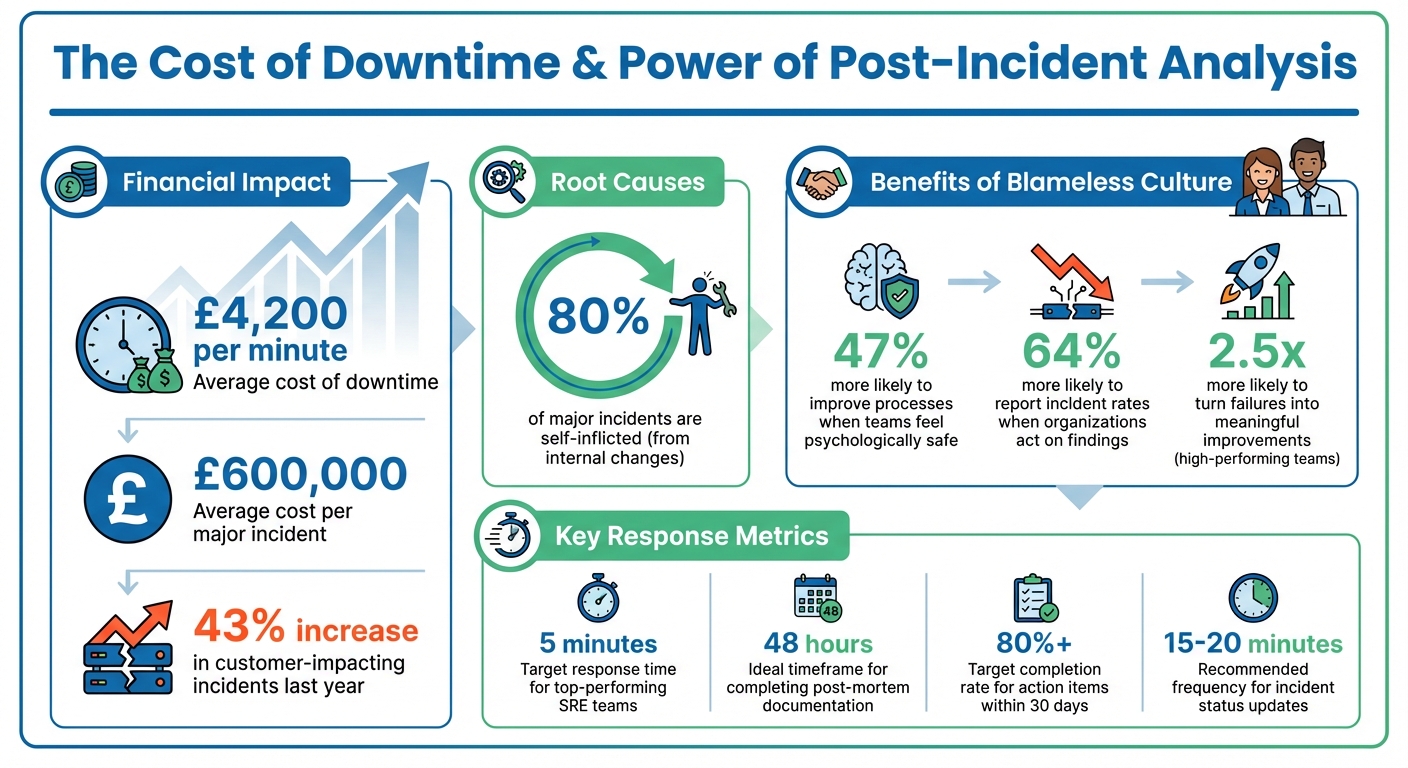
Post-Incident Analysis Key Statistics and Impact Metrics
How to run a Post-Mortem meeting, step-by-step
Building a Blameless Culture
The cornerstone of effective post-incident analysis is simple yet powerful: focus on what went wrong, not who made the mistake. A blameless culture is critical for uncovering the deeper system flaws that often cause repeated issues. Teams that feel psychologically safe are 47% more likely to work on improving processes and 64% more likely to report near-misses [10].
Sidney Dekker, author of The Field Guide to Understanding Human Error, describes the ideal environment like this:
An atmosphere of trust where people are encouraged to provide safety-related information, but clear lines are drawn between acceptable and unacceptable behaviour [10].
This philosophy, often referred to as a "Just Culture", focuses on holding people accountable for improving systems rather than blaming them for mistakes that are, frankly, inevitable. With this mindset, the following sections explore how to foster open communication and shift the focus to system-level issues.
Encouraging Open Communication
The first step is to separate learning from punishment. Make it clear that details from post-mortems won’t affect performance reviews or lead to disciplinary actions. When leaders actively reward team members for reporting problems or admitting to mistakes that uncover broader issues, it signals that honesty is valued over hiding errors.
Language plays a huge role here. Avoid pointing fingers with phrases like "John deployed without review." Instead, reframe it to focus on the system: "The deployment process allowed changes to production without an automated review." This subtle shift encourages a more constructive conversation.
Another key tactic is to appoint a neutral facilitator - someone uninvolved in the incident - to guide discussions. This ensures the conversation stays productive and blame-free, creating a space where everyone feels safe to share insights. By fostering this openness, teams can focus on addressing systemic weaknesses and driving continuous improvement.
Focusing on Systems, Not Individuals
When discussing human actions, use neutral terms like "generic responder" to highlight that anyone in the same situation might have made a similar mistake. Shift the focus by asking "What" and "How" questions - like "What allowed this to happen?" or "How can we prevent this in the future?" - instead of "Who did this?" or "Why did they do it?" This keeps the analysis centred on systems rather than individuals.
Be mindful of cognitive biases that can skew your analysis. For example, hindsight bias makes events seem more predictable after they’ve happened, while confirmation bias can lead you to favour evidence that supports your pre-existing beliefs. To counteract these, build your incident timeline starting from before the event and moving forward. You can also appoint a devil's advocate to challenge assumptions and bring fresh perspectives to the table.
The difference between traditional and blameless approaches couldn’t be clearer. Traditional post-mortems often ask, "Who caused this?" - creating a defensive, finger-pointing atmosphere. In contrast, blameless post-mortems focus on "What caused this?" - fostering a collaborative environment where the priority is fixing systems and learning from mistakes. By focusing on systemic analysis, teams can conduct post-incident reviews that are both thorough and genuinely productive.
Preparing for Post-Incident Reviews
Getting ready for a post-incident review isn’t just about ticking boxes - it’s what sets a meaningful session apart from a pointless one. Before you even think about gathering the team, make sure you’ve got the right people, a clear purpose, and reliable data. Without these, you’re just guessing, and that won’t help prevent future issues.
Identifying Key Stakeholders
First things first: assign a Post-Mortem Owner. This should be someone from the response team who was directly involved in the incident. Their job is to lead the investigation and handle the documentation. Then, pull in the engineers, DevOps, and SREs who were involved - they’ll bring the technical insights you need.
For more serious incidents, you’ll want to expand the circle. Bring in QA to pinpoint testing blind spots, Customer Support to measure user impact (think ticket volumes), and Operations for a broader view of the system. Don’t forget a neutral facilitator to keep things on track. If it’s a high-stakes incident, senior leadership - like Directors, VPs, or even the CTO - might need to join. But keep in mind, too many execs can make people hesitant to speak openly. If others want to learn from the session, you can always record it or share the documentation later.
Here’s a practical tip: keep the group size manageable. And don’t wait too long to start documenting - aim to get a draft going within 48 hours. Memories fade fast, and you’ll lose crucial details if you leave it too long. Also, make sure your facilitator isn’t doubling up as the note-taker. One person should focus on leading the discussion while another captures the key points.
Once you’ve got the right people in the room, it’s time to set clear objectives to guide the review.
Defining Objectives and Triggers
Not every little glitch deserves a full-blown post-mortem. Decide on clear, measurable triggers that warrant a formal review. These could include SEV‑1 or SEV‑2 incidents, data loss, security breaches, or outages lasting over a certain period - say, an hour. Monitoring tools can help automate these triggers, using metrics like affected users, reported outages, or even revenue impact [7].
The goal is to figure out how and why the system failed. To do this, tackle these four questions: What happened? Why did it happen? What went well? What needs to change to stop it happening again? [8]. A great tool for digging deeper is the "5 Whys" technique. Keep asking "why" until you move past surface-level answers (like "the server crashed") and uncover the root cause (maybe there’s no process for documenting operational limits) [8][11].
Don’t ignore near-misses either. Incidents that almost caused major problems are goldmines for learning. They can help you uncover hidden weaknesses before they lead to real downtime [12][11]. And here’s a sobering stat: 80% of major incidents are self-inflicted, often tied to internal changes like deployments or configuration updates [1]. With downtime costing an average of £4,200 per minute [1], having clear triggers and objectives isn’t just helpful - it’s critical.
Once your objectives are set, the next step is gathering accurate incident data.
Collecting Incident Data
To run a solid review, you need precise, real-time data. One way to do this is by having responders log key events as they happen, using a shared document or a tool like Slack. This keeps memories fresh and helps build an accurate timeline. Many modern incident management tools can even pull timestamps from chat logs, monitoring alerts, and deployment records, saving you a ton of manual work.
Make sure to collect logs, metrics, configuration snapshots, and dashboard screenshots, and store them in one central place. Using standardised templates can help keep things organised, making sure you capture the essentials like impact assessments, root causes, and key metrics such as Time to Detect (TTD), Time to Respond (TTR), and Time to Resolve (TTR) [12]. If you’re using video calls for incident response, platforms like Google Meet or Zoom can be a great way to record everything for later analysis without disrupting the responders.
During an active incident, try posting updates in a public channel every 15–20 minutes. This creates a natural, timestamped timeline that can be exported for the review [6]. And remember, use neutral language when documenting events. For example, instead of saying "Dev deployed bad code", go with something like "Deployment of version 1.2 initiated" [6]. Also, include links to relevant tickets, monitoring charts, and log searches so reviewers can easily verify the data [3].
A senior Google engineer once summed it up perfectly:
The longer you wait, the more people fill the void with speculation, which seldom works in your favour [6].
Conducting the Post-Incident Analysis
When an incident occurs, the key to preventing it from happening again lies in a thorough analysis. Start by piecing together a detailed timeline that spans from the initial triggers to the moment everything was resolved. This step-by-step breakdown helps you pinpoint what went wrong and how to fix it.
Using Root Cause Analysis Techniques
Begin by building a timeline that captures everything from the first warning signs to full recovery. This should include any pre-incident events, such as a deployment or configuration change, that might have set things in motion. Spotting these early indicators can be a game-changer [12][6].
Once the timeline is in place, dig deeper with the 5 Whys technique. This method pushes you to look beyond surface-level explanations. For instance, if a server crashes due to memory exhaustion, don’t stop there. Ask why the memory was exhausted, why a memory leak wasn’t caught, why tests didn’t flag it, and so on, until you uncover the underlying issue [8]. The goal here is to identify systemic problems rather than individual errors.
For more complex incidents, Fishbone diagrams (or Ishikawa diagrams) can be incredibly helpful. These diagrams allow you to categorise contributing factors - whether they’re related to human error, processes, technology, or external influences. By laying everything out visually, you can better understand how these elements combined to cause the failure [1]. As you map this out, make sure to distinguish between contributors (factors that led to the incident) and mitigators (factors that reduced its impact, like having the team available during working hours) [13]. Finally, assess the performance of your monitoring and response systems to see how they held up during the incident.
Evaluating Detection and Response
Next, evaluate how well your team detected and responded to the incident. Start by measuring Time to Detect (TTD) - the time it took to identify the problem after it began. Then assess Time to Respond (TTR), which tracks how quickly your team acted, and Time to Resolve (MTTR), which measures the total time needed to restore service [12].
Top-performing SRE teams aim to respond within 5 minutes of an incident being flagged [6]. If your team isn’t hitting this mark, it’s a clear area for improvement.
Also, note how the issue was detected. Was it flagged by automated monitoring, spotted by a team member, or reported by users? If customers noticed the problem before your systems did, that’s a major warning sign that your monitoring needs work [7][12]. Check the time gap between when users first reported the issue and when your systems picked it up - this will highlight blind spots in your alerting setup.
Don’t overlook the importance of communication during the incident. Was the team providing regular updates every 15–20 minutes? Consistent updates keep everyone informed and reduce unnecessary interruptions for the responders [6]. Beyond technical issues, look at operational factors like misleading runbooks, alert fatigue, or gaps in training [6][14]. When analysing human error, categorise it correctly: was it a slip (a momentary lapse of attention), a lapse (a memory failure), or a mistake (an incorrect assumption)? Each type requires a tailored approach to prevent recurrence [14].
Documenting Findings
Wrap up your analysis with a detailed report, ideally drafted within 48 hours [7][6][8]. Use clear, neutral language and avoid vague recommendations. For example, instead of saying "improve monitoring", be specific: "Add alerts for database connection pool usage exceeding 80%" [8].
The report should include:
- A comprehensive timeline of events
- Identified root causes
- An impact assessment (e.g., number of users affected, duration, financial impact)
- Specific action items with assigned owners and deadlines
Include supporting evidence like screenshots of monitoring dashboards and logs to back up your findings [3][12]. Remember, the purpose here is to learn and improve - not to assign blame. Focus on what failed within the system or process, not on who made a mistake [7][4][8]. By keeping the tone constructive, you’ll create an environment where teams feel safe to share insights and work towards better solutions.
sbb-itb-fe42743
Developing and Implementing Remediation Plans
Turning insights into action is where the magic happens. The key is to prioritise fixes, assign clear ownership, and track progress effectively. Start by ranking issues based on their impact and urgency - this ensures you're not just busy, but actually solving the right problems.
Prioritising Fixes
Not all issues are created equal. Begin by assessing how likely a problem is to occur again and how complex it is to fix. There's no point in over-engineering a solution for something that's a one-off event [16]. Use a simple ranking system - High, Medium, or Low - to map out the impact of each issue on system reliability and the urgency of fixing it [2].
It’s helpful to think of fixes in three categories: detection, prevention, and mitigation [17][2]. To cover all bases, include at least one action from each category. For example, if a system outage revealed gaps in monitoring, you’d want to add alerts (detection), update processes to avoid the same mistake (prevention), and have a fallback plan in place (mitigation).
One common pitfall is acting too quickly based on recent events. Give yourself 24–48 hours to evaluate the situation properly [9]. This short pause ensures your remediation plans are realistic and well thought out. Once prioritised, integrate these tasks into your regular planning cycles, whether that’s sprints or quarterly roadmaps [18][3].
Take Amazon's infamous S3 outage in February 2017 as an example. A simple typo triggered a cascade of failures, disrupting major services like EC2 and EBS for about four hours. Their remediation plan? They updated their tools to remove servers more gradually and added safeguards to ensure critical subsystems couldn’t be taken offline. This wasn’t just a quick patch - it was a long-term fix to prevent similar issues down the line [17].
Assigning Ownership and Deadlines
Here’s a golden rule: if everyone owns a task, no one does. Each action item needs a single, named owner who has the bandwidth and the know-how to get it done [1][3]. Without clear accountability, tasks tend to slip through the cracks.
Deadlines need to be realistic. Small fixes, like updating documentation or adding a missing alert, might take two weeks. Bigger jobs, like refactoring code or upgrading tools, could need four to eight weeks [6][1]. For major architectural changes, break them into phases and align them with your quarterly plans.
A handy framework to follow is Actionable, Specific, Time-bounded (AST). Every task should start with a clear action verb (e.g., "implement", "document"), outline exactly what needs doing, and include a firm deadline [2]. For instance, instead of saying "improve monitoring", try "Add alerts for database usage exceeding 80% by 15 April 2026."
Keep everything organised in your project management tool - be it Jira, Linear, or something else. Label tasks with their severity and deadlines to make tracking simple [2][15]. Automated reminders through Slack or PagerDuty can also help keep deadlines visible and prevent things from falling off the radar [1].
"When everyone owns it, no one owns it. Without a single accountable owner, the task never happens." – Atlassian [1]
Monitoring and Validating Results
Fixes are only as good as the results they deliver. Define clear success criteria for each task upfront. For example, if you’re adding new monitoring, success could mean detecting a similar issue within 30 seconds during a simulated test [11].
Key metrics like Time to Detect (TTD), Time to Resolve (TTR), and recurrence rates are your best friends here. If your TTD drops after adding new alerts, or if a problem doesn’t reappear, you know your fixes are working [2][3].
It’s crucial to review progress monthly to ensure remediation tasks aren’t sidelined by day-to-day work [3][11]. Leadership involvement in these reviews shows commitment to reliability and helps remove blockers. You might even consider running "Game Days" - simulated failures to test whether your fixes hold up in the real world [6][1].
"A successful postmortem is a strategic tool for ongoing growth, resilience, and improvement." – PagerDuty [2]
Finally, keep an eye on trends over time. If the same issues keep cropping up, it’s a sign that previous fixes didn’t fully address the root cause [15]. Use this feedback to refine your approach and close any gaps in your processes.
For organisations looking to embed structured remediation into their workflows, working with experts like Metamindz (https://metamindz.co.uk) can help tailor these strategies to fit your specific needs. Once your fixes are validated, the next step is to weave these improvements into your day-to-day operations.
Continuous Improvement Through Follow-Up
Post-incident analysis is only as good as the changes it inspires. A report that sits untouched on a shared drive doesn’t help anyone. The real goal is to transform every misstep into a stepping stone for stronger, more resilient systems.
Standardising Documentation
Without a clear structure, it’s easy for key details to get lost, making comparisons between incidents a headache. A well-designed template is your best friend here. It should cover the basics like an incident summary, a detailed timeline, root cause analysis, impact assessment, lessons learned, and - most importantly - actionable follow-up items [5][2][8].
Set clear triggers for when a review is mandatory. For example, incidents involving Sev-1/Sev-2 issues, data loss, security breaches, or long outages should always prompt a review [8][3]. This removes any guesswork and ensures no critical incident is overlooked.
Store these reports in a central, searchable repository like Confluence or Notion. This creates a “knowledge bank” that new team members can access without having to ask for a history lesson [5][8][9]. To keep things moving, assign a specific owner - often the Incident Commander or lead responder - and set a deadline of 48 hours to five days after the incident is resolved [2][7][3]. Quick documentation is key because memories fade fast.
"At Google, postmortems are written to encourage thoughtful reflection and concrete follow-up actions." – Google SRE Book [5]
Reviewing Trends and Metrics
While a single incident tells you what went wrong, trends reveal why things keep going wrong. That’s why regular reviews - monthly or quarterly - are crucial for spotting recurring patterns [3]. Use these sessions to analyse aggregated data and track metrics like Time to Detect (TTD), Time to Resolve (TTR), and incident frequency. These numbers give you a clear picture of whether your response processes are improving [7][2].
Teams that excel at this are 2.5 times more likely to turn failures into meaningful improvements [5]. They don’t just patch problems; they follow up to see if those patches actually work. Keep an eye on your action item completion rate (aim for over 80% within 30 days) and the repeat incident rate to ensure fixes are effective [8].
Here’s a sobering stat: customer-impacting incidents jumped by 43% last year, with an average cost of nearly £600,000 per incident [2]. If the same issues keep cropping up, it’s a red flag that your previous fixes didn’t address the root cause. These insights are gold for refining your operational processes.
Integrating Lessons into Processes
Once you’ve gathered insights and spotted trends, the next step is weaving those lessons into your day-to-day operations. For example, feed findings from post-incident reviews directly into your sprint planning to make sure remediation tasks get prioritised alongside shiny new features [3]. Update runbooks, policies, and training materials to reflect what you’ve learned [5][9].
Tools like the “5 Whys” can help you dig deeper than surface-level human error. Often, the real culprits are design flaws in your deployment pipelines, monitoring tools, or system architecture [19][8]. Categorising action items into detection, prevention, and mitigation ensures you’re tackling resilience from all angles [17][7]. The aim isn’t just to fix things faster - it’s to build systems that are harder to break in the first place.
Conclusion
Post-incident analysis is all about creating systems that don’t fail the same way twice. The best organisations see every failure as an opportunity to strengthen their processes, not as a chance to point fingers. By shifting the focus from blaming individuals to examining systems, you build an atmosphere where engineers feel comfortable sharing the details needed to fix problems effectively.
The benefits of this approach are clear. Top-performing teams use these lessons to significantly reduce repeat incidents, and organisations that act on their findings can cut future incident rates by up to half [1]. But this improvement only happens when you go beyond just writing reports. It requires assigning ownership, setting achievable deadlines, and keeping track of progress to ensure changes are made.
Human error signals deeper systemic issues. – Dave Zwieback, former Head of Engineering, Next Big Sound [1]
To turn setbacks into stepping stones for resilience, it’s crucial to act quickly and deliberately. Write post-mortems within 48 hours while the details are still fresh, dig deeper with tools like the "5 Whys" to uncover root causes [1], and set clear thresholds to automatically review Sev-1 incidents [16]. Most importantly, share your findings widely to build trust and prevent the same mistakes from happening again.
With customer-impacting incidents rising by 43% last year and each one costing nearly £600,000 on average [2], treating post-incident analysis as just another task on your to-do list isn’t an option. Make it a central part of how your team learns and improves. By treating every incident as a lesson, you’ll create systems that are not only more reliable but also better prepared for the future.
FAQs
How do we choose which incidents need a post-mortem?
Incidents that call for a post-mortem are typically those with a large impact, involve complex challenges, or highlight underlying systemic issues. It’s crucial to prioritise events that cause major disruptions, expose critical vulnerabilities, or uncover flaws in processes. For example, situations like outages, system breakdowns, or significant service interruptions should be reviewed to pinpoint root causes and strengthen future resilience.
The key is to focus on incidents that provide meaningful learning opportunities. Minor hiccups or low-impact issues might not justify the effort, but digging into the bigger problems can pave the way for ongoing improvements.
What’s the simplest way to run a blameless post-incident review?
To conduct a successful blameless post-incident review, it’s all about creating a structured and collaborative process that prioritises learning over assigning fault. Here’s how you can approach it:
- Bring together a diverse team: Include people with different perspectives and roles who can provide a well-rounded view of the incident.
- Set an open agenda: Create a safe space for open discussion, where everyone feels comfortable sharing their thoughts without fear of judgement.
- Review the incident factually: Stick to the facts, avoiding speculation or emotional reactions, to ensure the discussion stays constructive.
- Identify contributing factors and lessons: Dig into what led to the incident and uncover key takeaways that can help prevent similar issues in the future.
- Agree on follow-up actions: Align on clear, actionable steps to address the root causes and improve processes going forward.
This approach not only helps improve systems and processes but also builds accountability and strengthens team collaboration - without anyone feeling targeted or blamed. It’s about learning and growing together.
How do we make sure post-mortem actions actually get done?
To make sure the actions from a post-mortem actually get done, it's crucial to be clear and organised. Start by defining follow-up tasks in detail - vague tasks like "fix the issue" won’t cut it. Be specific about what needs to be done, who’s responsible, and when it’s due. Assigning clear ownership ensures everyone knows their role and avoids things slipping through the cracks.
It’s also a good idea to have regular check-ins or follow-up meetings. These help you keep tabs on progress and give people a chance to flag any blockers. Plus, it keeps the team accountable without letting things drag on indefinitely.
Another step is to measure how many of these tasks get completed and take a moment to review their impact. Did the changes actually solve the issue or improve the process? This kind of reflection not only helps with continuous improvement but also shows the team that these actions matter.
Finally, fostering a culture where the focus is on fixing systems rather than blaming individuals makes a huge difference. If people feel safe to speak up and work on solutions, they’re more likely to engage with the process. Making follow-ups a formal, expected part of your post-mortem routine will also boost the chances of success.