
Scaling Databases with Redis Caching

Scaling Databases with Redis Caching
When your database slows down during high traffic, Redis caching can save the day. By keeping frequently accessed data in memory, Redis speeds up data retrieval, reducing the load on your database. It's like giving your infrastructure a turbo boost without needing to overhaul everything.
Here’s the gist:
- Why Redis Helps: It offloads read-heavy queries from your database, making things faster and smoother for users.
- Caching Patterns: Use methods like cache-aside (on-demand loading), write-through (synchronised updates), or write-behind (async updates) depending on your needs.
- TTL Settings Matter: Set expiry times to keep data fresh and avoid stale information. Add randomness to prevent sudden traffic spikes when data expires.
- Scaling Redis: Start with a single instance, then move to clustering for larger traffic. Redis Cluster spreads the load across multiple servers and handles failover for reliability.
- Security Is Key: Always deploy Redis in a secure network with encryption and access controls, especially for GDPR compliance in the UK.
For example, during Black Friday sales, e-commerce platforms often face massive surges in traffic. Redis ensures users don’t experience slowdowns by handling the bulk of read requests, leaving the database free for other operations.
If you’re not sure how to set this up or scale it for your business, fractional CTOs like Metamindz can guide you through the process, tailoring solutions to your needs. Redis isn’t just about speed; it’s about keeping your systems reliable under pressure.
Caching Strategies With Redis

Common Caching Patterns in Redis
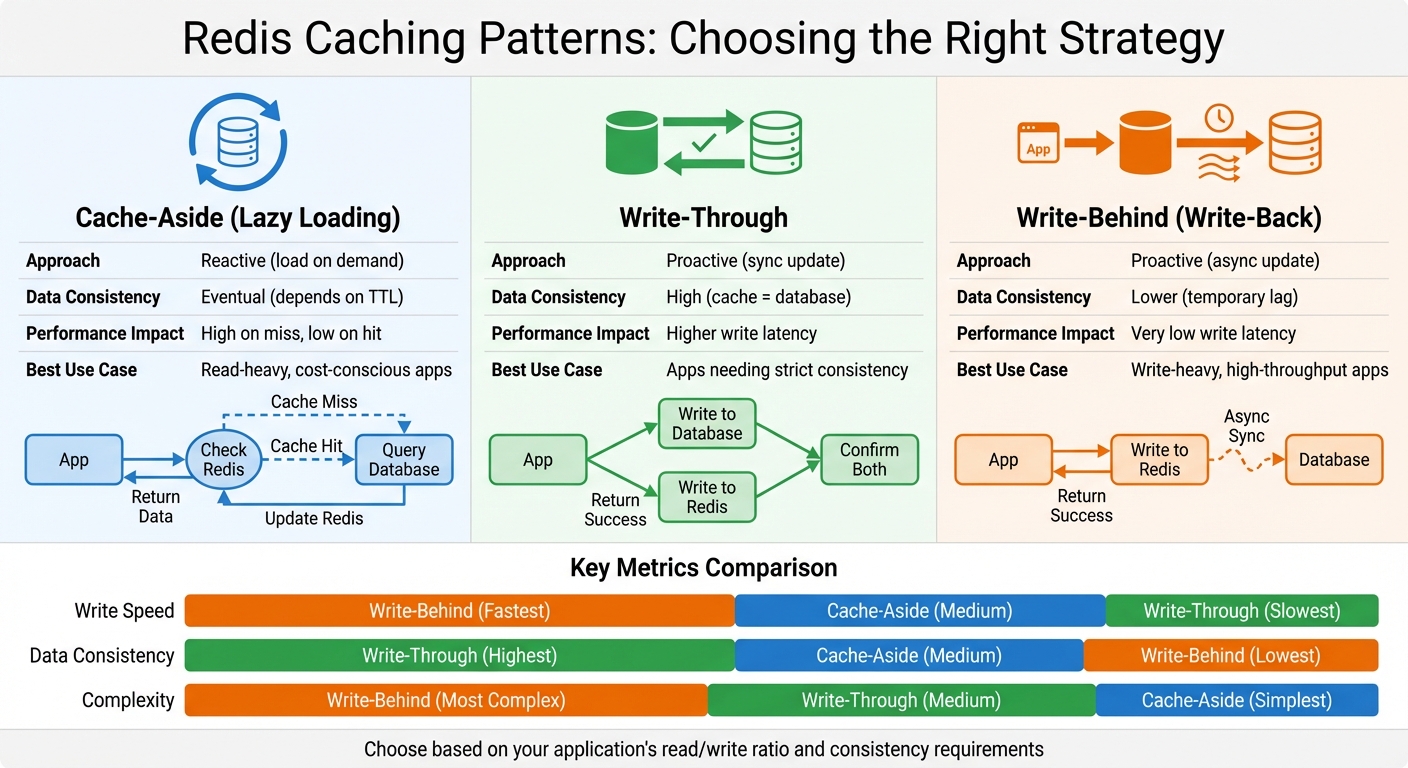
Redis Caching Patterns Comparison: Cache-Aside vs Write-Through vs Write-Behind
Picking the right caching pattern is like choosing the right tool for a job - it shapes how your app interacts with Redis and your primary database. Each pattern has its own balance of consistency, performance, and complexity. Knowing when to use each one is key to scaling efficiently.
Cache-Aside, Write-Through, and Write-Behind Patterns
Cache-Aside (or lazy loading) is probably the simplest strategy. When your app encounters a cache miss, it queries the database, updates Redis with the result, and then serves the data to the user. This works well for read-heavy applications, where you don’t want to overload your database unnecessarily [5][2].
Write-Through takes a more proactive approach. Every time your app updates data, it writes to both the database and Redis at the same time. This guarantees that the cache always reflects the database, so there’s no risk of stale data. But the trade-off? Higher write latency, since both systems need confirmation. It's a solid pick for apps that need strict data consistency [5][1].
Write-Behind (or write-back) flips the script. Your app writes data directly to Redis, and Redis takes care of updating the database asynchronously in the background. This keeps write latency low, making it perfect for write-heavy applications. But there’s a catch - if Redis fails before syncing, you might end up with inconsistent data [1][7].
| Pattern | Approach | Data Consistency | Performance Impact | Best Use Case |
|---|---|---|---|---|
| Cache-Aside | Reactive (load on demand) | Eventual (depends on TTL) | High on miss, low on hit | Read-heavy, cost-conscious apps [5][2] |
| Write-Through | Proactive (sync update) | High (cache = database) | Higher write latency | Apps needing strict consistency [5][1] |
| Write-Behind | Proactive (async update) | Lower (temporary lag) | Very low write latency | Write-heavy, high-throughput apps [1][7] |
Now that we’ve covered caching patterns, let’s dive into how TTL settings can keep your cached data fresh and efficient.
TTL and Expiry Strategies
Once you’ve chosen your caching pattern, setting an appropriate TTL (time-to-live) is the next step to managing data freshness. TTL determines how long data sticks around in Redis before it expires. The trick is to match TTL with how often your data changes and how much stale information your app can handle [8].
For data that doesn’t change often - like country codes or product categories - longer TTLs, measured in hours or even days, work fine. For dynamic data, like live user activity feeds, you’ll want much shorter TTLs.
Here’s a handy tip: add a bit of randomness (jitter) to your TTLs. For example, instead of setting every cache entry to expire at exactly 3,600 seconds, you could use 3600 + random(0, 300). This spreads out cache expirations over a few minutes, preventing a sudden flood of database queries when everything expires at once (a.k.a. the "thundering herd" problem) [8][9].
Redis handles expiry in two ways: passive expiration, where keys are deleted when accessed after their TTL has expired, and active expiration, where Redis scans for expired keys and removes them periodically. Since Redis 6, this process has been improved with a radix tree to track expiring keys, and you can tweak its behaviour using the active-expire-effort parameter [10].
Designing Key Structures
A well-thought-out key structure makes your life much easier. By using a hierarchical format with colons (e.g., customer:profile:1001 or order:details:8472), you can keep your keys organised and avoid collisions [11].
For query caching, you can simplify things by using the SQL statement itself as the key. This creates a seamless caching layer: your app checks Redis for the query result, and if it’s not there, runs the query on the database and caches the outcome. While this approach can lead to longer, less human-readable keys, it eliminates the need for a separate mapping table [11].
Avoid generic keys like user-activity-list. Instead, include specific identifiers, such as user:123:activity-list, to ensure data is isolated for each user [6]. When dealing with complex objects, consider using Redis Hashes. This allows you to store individual fields separately, so you can update specific attributes without having to fetch and overwrite the entire object [11]. It’s a neat way to keep things efficient and flexible.
Building a Scalable Architecture with Redis
Once you've nailed down your caching patterns, the next step is scaling Redis effectively. This means knowing when to introduce it, how to scale it properly, and understanding the costs involved.
When to Add Redis Caching
Before jumping into Redis, take a close look at how your database is performing. If it’s handling queries without breaking a sweat and response times are solid, you can probably hold off for now. But when your database starts to struggle with heavy read traffic - think slow queries or hitting connection limits - it’s time to bring Redis into the mix. Adding Redis can seriously boost performance, increasing data throughput by over 800% and slashing latency by more than 1,000% [13].
For instance, UK-based e-commerce platforms often face massive traffic spikes during sales events like Black Friday. Similarly, SaaS apps experiencing rapid user growth can benefit hugely from offloading read-heavy workloads using a cache-aside pattern [2]. Once you’ve set up caching, the next step is ensuring your system can handle growing traffic through clustering.
High Availability and Clustering
When a single Redis instance can no longer handle the load, it’s time to think about horizontal scaling with Redis Cluster. Instead of just adding more RAM to a single server (vertical scaling), Redis Cluster spreads your data across multiple servers - or shards - making scaling far more efficient.
"Performance will scale close to linearly by adding more Redis servers to the system."
Justin Castilla, Senior Developer Advocate at Redis [4].
Redis Cluster uses 16,384 hash slots to distribute keys using a deterministic hash function. This setup allows for dynamic rebalancing as you add or remove shards. Plus, the cluster has built-in failover - if a primary shard goes down, one of its replicas automatically steps up to take over. To keep things running smoothly, always use an odd number of primary shards and have at least two replicas for each shard.
"To prevent split-brain situations in Redis Cluster, always keep an odd number of primary shards and two replicas per primary shard."
Justin Castilla [4].
Here’s a quick comparison of scaling approaches:
| Scaling Approach | Method | Throughput Impact | Complexity | Best For |
|---|---|---|---|---|
| Vertical (Scale Up) | Add RAM/CPU to one server | Limited by single-threaded processing | Low | Small to medium growth; RAM limits |
| Horizontal (Scale Out) | Add more server instances (shards) | Scales near-linearly with added nodes | Higher | Large-scale growth; high ops/sec demands |
With clustering sorted, the next challenge is balancing cost and performance.
Cost and Performance Trade-offs in the UK
Scaling Redis isn’t free, and the biggest cost driver is RAM. Managed services like AWS ElastiCache or Azure Cache for Redis can save you time on operations, but they come at a premium compared to self-hosting [4][12][13].
For larger datasets, tiered storage solutions like Redis on Flash can help cut costs by up to 80%. How? By shifting less-frequently accessed data to NVMe drives instead of keeping everything in pricey RAM [1]. Another smart move is using read replicas to handle read-heavy traffic. By offloading some of the load, you can reduce the strain on your primary instance. Just make sure replica-read-only is enabled to avoid any data consistency issues [14].
To avoid costly crashes, set a maxmemory limit in your configuration and leave about 25% of system memory as overhead for the OS and replica output buffers. Trust me, running out of memory mid-operation is a headache you don’t want to deal with [14].
If you’re scratching your head about how to balance these trade-offs or design a cost-effective Redis setup, it might be time to bring in a fractional CTO. At Metamindz, we’ve helped countless UK businesses build smart caching strategies - whether it’s picking the right storage tier, fine-tuning eviction policies, or planning for future growth. A fractional CTO can streamline the process and ensure you’re scaling Redis the right way.
sbb-itb-fe42743
Operating Redis Caching in Production
When it comes to running Redis in a production environment, the stakes are high. You’re not just setting up a cache - you’re building a system that needs to handle real-world traffic, memory constraints, and the occasional unexpected meltdown. Let’s dig into the key elements to keep Redis stable, fast, and reliable in production.
Capacity Planning and Eviction Policies
First things first: set a strict maxmemory limit. A good rule of thumb is to leave about 25% of your system’s memory for the operating system and replica buffers. This buffer can help prevent crashes when Redis is under load[14].
Now, what happens when Redis hits that memory limit? Eviction policies kick in. For most caching use cases, allkeys-lru (Least Recently Used) is a solid choice - it clears out the least active keys to make room for new ones. If you’re dealing with keys that have expiry times, volatile-lru might be more suitable since it only targets keys with a TTL. Pick the policy that matches your workload.
Don’t forget connection limits. By default, Redis supports 10,000 simultaneous clients, which might sound like a lot - until you start scaling microservices or using hefty connection pools. If needed, adjust maxclients and other connection parameters like tcp-backlog. Also, tweak kernel settings to handle larger volumes without breaking a sweat[14].
Lastly, there’s a sneaky system setting to watch out for: transparent huge pages (THP). These can cause latency spikes during memory allocation. Disabling THP at the OS level is a must when you’re running Redis under heavy load[14].
Once memory and capacity are sorted, it’s time to tackle the chaos of traffic surges and hot keys.
Handling Traffic Spikes and Hot Keys
Traffic spikes are inevitable. Think Black Friday sales or a viral product launch. These moments can strain Redis, especially if you’ve got hot keys - those few keys that hog a disproportionate amount of traffic. For example, it’s not uncommon for 80% of requests to hit just 1% of your keyspace[15]. This can push CPU usage to 95% and send latency skyrocketing from milliseconds to over a second[18].
Here’s a real-world example: one team discovered that 13 requests per second were triggering 300 calls to a single Redis key. That’s 3,900 operations per second on one shard, maxing out its CPU at 95% and pushing egress traffic to 1.5 GB/s[18]. Their fix? Refactoring the code so that the key was fetched just once per API call instead of repeatedly in a loop.
To detect hot keys before they cause problems, Redis 8 has a built-in tracking feature - just enable it with CONFIG SET hotkey-tracking on. For older Redis versions, you can use redis-cli --hotkeys or even the MONITOR command (though it’s resource-intensive, so use it sparingly)[15][17].
What can you do about hot keys? Here are a few strategies:
- L1 Local Caching: Use an in-process cache like Caffeine or BigCache to cut down on trips to Redis[15].
- Key Sharding: Break a hot key into multiple shards (e.g.,
product:123:1,product:123:2). Writes go to all shards, while reads are distributed randomly[15]. - Read Replicas: Offload read-heavy traffic to replicas. Just remember, replication is asynchronous, so there may be a slight delay in updates[15].
- Request Coalescing: Instead of calling Redis multiple times in a loop, fetch the data once per request. This can be a game-changer[18].
If you’re deleting large keys, use the UNLINK command instead of DEL. It removes data asynchronously, so it won’t block Redis’s event loop[17].
With traffic under control, let’s move on to monitoring and recovery.
Monitoring and Disaster Recovery
A well-monitored Redis setup is a happy Redis setup. Start with the basics: your cache hit ratio. This is the balance between keyspace_hits and keyspace_misses. A low hit ratio means your cache isn’t pulling its weight, and your database might be taking an unnecessary beating. Keep an eye on memory usage, eviction rates, and latency, too. Redis’s latency-monitor tool is great for spotting bottlenecks caused by large datasets, slow networks, or complex commands[16].
For disaster recovery, Redis Cluster is your best friend. It handles automatic sharding and failover. If a master node fails, a replica takes over automatically. To make this work smoothly, ensure every master has at least one replica, and aim for an odd number of primary shards to avoid split-brain scenarios during network partitions[4]. Don’t forget to open the required ports (like 6379 for clients and 16379 for the cluster bus) in your firewall[19].
One caveat: Redis’s asynchronous replication can lead to lost writes during failover. If that’s a dealbreaker, use the WAIT command for synchronous replication, but be aware of the performance hit[19].
For full system restarts, enable persistence with either AOF or RDB. This ensures data can be recovered from disk if Redis goes down[12]. If you’re running Redis in Docker, use host networking mode (--net=host) because Redis Cluster doesn’t play nicely with NATted environments[19].
To keep an eye on things, tools like RedisInsight offer real-time visualisation, and you can use redis-cli --cluster check <node> to verify cluster health. For failover testing, the consistency-test.rb script included with Redis is a handy option[19].
Integrating Redis into Your Database Scaling Strategy
Redis plays a key role in a broader scaling strategy. Its strength lies in working alongside other techniques like query optimisation and database sharding. Picture Redis as a high-speed middle layer between your application and primary database. It handles the bulk of read traffic, leaving your database free to focus on writes and complex operations [2][3].
To put this into perspective, a typical database query might take around 100ms, but Redis can respond in just 2ms [6]. That’s a massive difference. If you’re running three synchronous queries, you’re looking at reducing response time from 300ms to just 6ms. As Redis themselves explain:
"Three synchronous queries on a page could easily take upwards of 300 milliseconds just to return data from the database... Caching queries in Redis could turn that 300 milliseconds into just six milliseconds" [6].
For UK e-commerce businesses, where every millisecond can affect conversion rates, this kind of speed boost is a game changer.
By caching frequently accessed data, Redis can delay the need for sharding, as it offloads traffic from your database. Achieving a 90% cache hit rate could cut database query time from minutes per hour to mere seconds [6]. This not only improves performance but also saves costs by postponing expensive infrastructure upgrades.
Impact on Application Design
When it comes to application design, the cache-aside pattern is one of the easiest ways to integrate Redis [1][5]. However, caching does come with a catch: eventual consistency. If a database record is updated, the cached version might still show old data until it’s refreshed or invalidated. You can manage this with strategies like:
- Expire on Write: Delete the cache key whenever the database updates.
- Expire on Time: Use time-to-live (TTL) settings tailored to how often data changes. For instance, product prices might have a 5-minute TTL, while user profiles could stay cached for an hour.
If you’re planning to scale with Redis Cluster, brace yourself for some code adjustments. Multi-key operations, such as Lua scripts or transactions, won’t work across shards unless you use hashtags to group related keys into the same slot. For example, {user123}:profile and {user123}:settings would need to share the same hash slot [20]. Without this, you might run into "CROSSSLOT" errors, which could require significant refactoring [20][21].
These changes in design naturally lead us to the next critical area: security and compliance.
Security and Compliance Considerations
Performance is important, but security is non-negotiable - especially with UK GDPR requirements. Storing personal data in-memory comes with serious responsibilities. Rule number one: Redis should never be exposed to the public internet. Always deploy it within a Virtual Network (VNet) or VPC, and use Private Links to keep traffic off public routes [23][24]. For UK businesses, ensure Redis instances are hosted in local data centres, such as UK South or UK West, to meet data residency requirements [23].
Encryption is a must. Use TLS 1.2 or 1.3 for data in transit and 256-bit AES encryption for data at rest. These meet FIPS 140-2 standards and ensure your data is well-protected [23]. As Jon Cosson, Head of IT and Chief Information Security Officer at JM Finn, aptly puts it:
"Data sovereignty is not a buzzword, it's survival" [23].
For access control, ditch the outdated requirepass shared password. Redis 6.0 introduced Access Control Lists (ACLs), which let you define permissions at a granular level [22][23][24]. In cloud environments like Azure, integrate Redis with Microsoft Entra ID for role-based access control (RBAC) [23]. Also, disable or rename risky commands like FLUSHALL, CONFIG, and SHUTDOWN to avoid accidental or malicious damage [22][24].
To stay GDPR-compliant, implement data minimisation by setting TTLs on all keys. This ensures stale data is automatically removed. Enable diagnostic logging to track client IPs and authentication attempts. On Azure, these logs can be routed to Azure Monitor Logs for easy analysis [23].
How Fractional CTO Services Can Help
Getting Redis right isn’t just about plugging it into your system - it involves key architectural decisions, code tweaks, tightening security, and ongoing monitoring. That’s where Metamindz steps in. As a CTO-led technology partner, Metamindz offers fractional CTO services tailored to your needs, helping you build scalable, secure, and cost-efficient systems.
Whether you’re adding Redis to an existing setup or starting fresh with a high-traffic app, Metamindz provides hands-on support. They’ll assist with architecture reviews, implementation, and ongoing oversight. For UK startups and scale-ups, this includes expert guidance on GDPR compliance, data residency, and managing costs - without the expense of hiring a full-time CTO.
Metamindz also offers technical due diligence for investors, delivering clear assessments of tech infrastructure with actionable insights. If you’re scaling quickly and need Redis to perform at its best, their fractional CTO services ensure your architecture stays secure, efficient, and ready for growth. Learn more at metamindz.co.uk.
Conclusion
Redis caching stands out as a game-changer for scaling databases. By storing frequently accessed data in RAM, it delivers lightning-fast responses with sub-millisecond latency. For businesses across the UK, Redis turns database bottlenecks into opportunities to gain a competitive edge.
The impact is clear: Redis can drastically improve throughput while slashing latency [13]. Take Chipotle, for instance - they’ve successfully used Azure Cache for Redis to handle high-traffic demands without overhauling their database infrastructure [13]. Whether you’re managing an e-commerce platform during Black Friday or powering real-time analytics for thousands of users, Redis provides the scalability and reliability modern applications demand.
Key Takeaways
Let’s recap the essential strategies for securely and efficiently scaling your database with Redis:
- Strategic caching is key: Use thoughtful TTL settings, robust eviction policies, and ensure airtight security.
- Pick the right caching pattern: Cache-Aside works well for read-heavy workloads, Write-Through ensures consistency, and Write-Behind is ideal for high-volume writes [1].
- Prioritise security: Deploy Redis within a secure network, enable TLS encryption, and use ACLs for fine-grained access control.
- Plan for scaling: Applications not built for clustered Redis might encounter CROSSSLOT errors, requiring significant refactoring.
- Monitor performance closely: Keep an eye on cache hit rates to maintain optimal efficiency.
Scaling Redis effectively often requires expert input. That’s where Metamindz can help. Their fractional CTO services, priced at £2,750 per month, provide direct access to experienced CTOs who’ll work hands-on with your team. From optimising Redis deployments and ensuring GDPR compliance to planning for future growth, they’ll tailor guidance to your specific needs.
Redis caching isn’t just about solving scaling issues - it’s about turning those challenges into strategic wins. And with expert support from Metamindz, you can unlock the full potential of Redis for your organisation.
FAQs
How does Redis caching enhance database performance during periods of high traffic?
Redis caching is a game-changer when it comes to speeding up database performance. By keeping frequently accessed data in memory, it takes a huge load off your primary database. The result? Queries that can be processed in sub-millisecond time. Imagine your app handling way more concurrent users during a traffic spike without breaking a sweat - pretty impressive, right?
When you shift read operations to Redis, you’ll notice a significant jump in throughput. This means your application stays smooth and responsive, even when demand is at its peak. It’s a smart choice for scaling your app while keeping things fast and reliable for users.
What are the key differences between cache-aside, write-through, and write-behind caching strategies?
When it comes to caching, there are three popular strategies that developers often rely on: cache-aside, write-through, and write-behind. Each one tackles the challenge of syncing data between the cache and the database in its own way. Let’s break them down:
- Cache-aside: Here, the application takes charge of managing the cache. If the requested data isn’t in the cache (a "cache miss"), the application fetches it from the database, updates the cache with the data, and then serves the result. Think of it as a "fetch-on-demand" approach - efficient but requires the application to handle the logic.
- Write-through: With this approach, every time data is written, it’s sent to both the cache and the database at the same time. The upside? The cache is always in sync with the database. The downside? It can slow things down because each write involves two operations instead of one.
- Write-behind: This method flips the script. Data is written to the cache first, and then the database is updated asynchronously. This improves write performance since the database update happens in the background. However, there’s a risk: if the cache fails before the database is updated, you could lose data.
The choice between these strategies boils down to what your application needs most - speed, consistency, or resilience. Each has its strengths and trade-offs, so it’s all about finding the right balance for your specific use case.
How can I make sure Redis is secure and meets GDPR requirements?
To keep Redis secure and in line with GDPR requirements, the first step is enabling TLS/SSL encryption. This ensures that any data being sent or received is protected while in transit. Next, take advantage of Redis' access control lists (ACLs) and implement robust authentication methods to tightly manage user permissions. For added security, encrypt any sensitive data stored on disk and limit network access strictly to trusted hosts.
On top of that, make sure you’ve set up data-retention and deletion policies that align with GDPR’s focus on data minimisation and accountability. Keeping detailed audit logs is another must - these logs can help you not only track issues but also demonstrate compliance if needed. Lastly, make it a habit to regularly review your Redis configuration to ensure your security and compliance measures stay up to date.